'/%3e%3cpath%20id='cross_2'%20data-name='cross%202'%20class='cls-2'%20d='M20.612,30.43h0a5.361,5.361,0,1,0-10.723,0H0A33.709,33.709,0,0,1,30.569,0V9.75a5.361,5.361,0,1,1,0,10.723V30.43Z'%20transform='translate(67.193%200.007)%20rotate(90)'/%3e%3cpath%20id='cross_3'%20data-name='cross%203'%20class='cls-3'%20d='M20.612,30.43h0a5.361,5.361,0,1,0-10.723,0H0A33.709,33.709,0,0,1,30.569,0V9.75a5.361,5.361,0,1,1,0,10.723V30.43Z'%20transform='translate(67.186%2067.041)%20rotate(180)'/%3e%3cpath%20id='cross_4'%20data-name='cross%204'%20class='cls-4'%20d='M20.6,30.5h0a5.361,5.361,0,1,0-10.723,0H0A33.71,33.71,0,0,1,30.56,0V9.818a5.361,5.361,0,1,1,0,10.723V30.5Z'%20transform='translate(0%2067.041)%20rotate(-90)'/%3e%3c/svg%3e)
Viewing HTML Files
You can view HTML files directly in the workspace without downloading them.
HTML Preview (Rendering)
- Opening an
.htmlfile shows a preview of the file as below.

- If CSS, image, or JS files are in the same folder, resources referenced from the HTML run together with it. If you upload a build output from Vite or similar tools as a whole folder, it works as-is.
- Click
Raw Datain the top right to view the raw content.
Using Interactive Documents
Because JavaScript (JS) runs, HTML files with interactions such as clicks, animations, and tab switching can be run as-is. Without a separate server or deployment, uploading to a folder is all it takes for the entire team to run it.
Usage Examples
- Prototype proposals where clicking a button switches the screen
- Reports containing charts or graphs
- Proposals with interactions like tabs and accordions
Blocking Script Execution
If an HTML file contains a script (<script>) or an event handler, its execution is blocked for security.
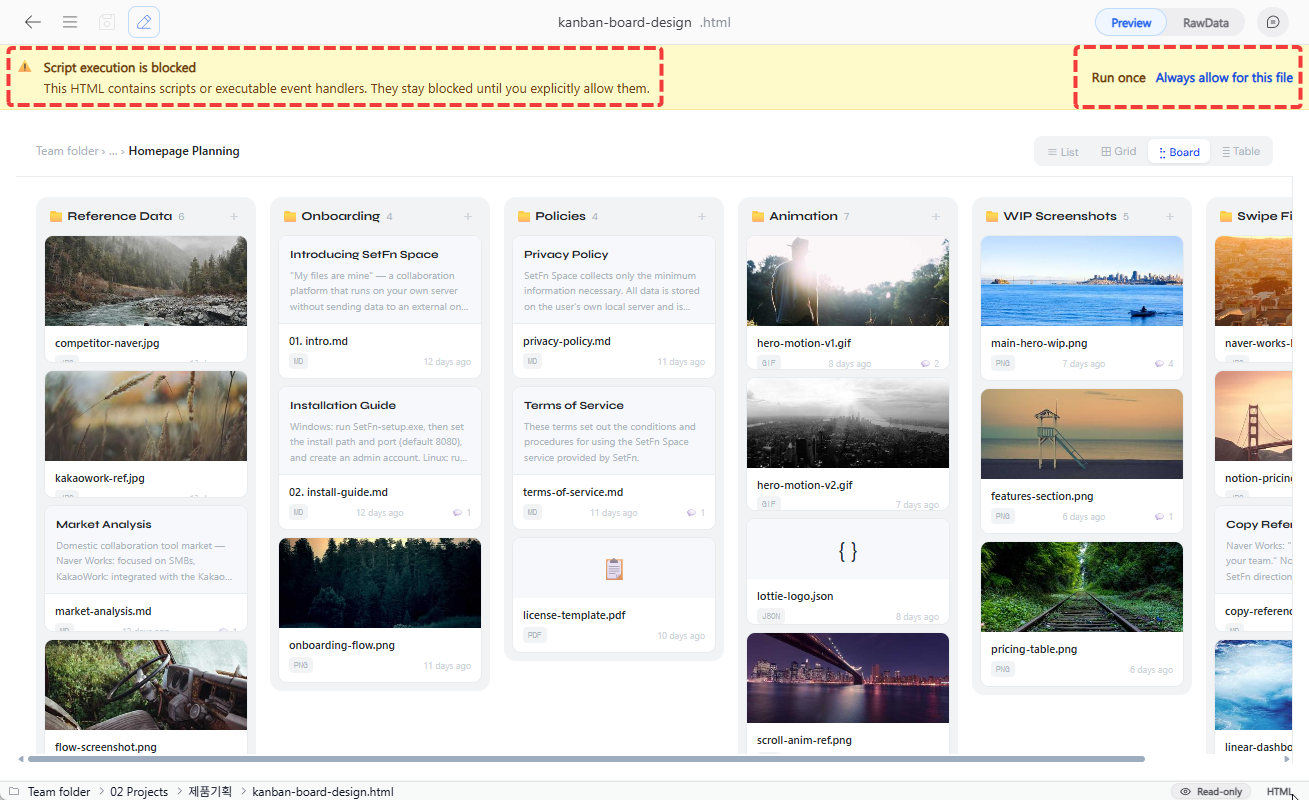
| Option | Description |
|---|---|
| Run once | Allows the script only for the current viewing session. |
| Always allow this file | Automatically allows scripts for this file going forward. |