'/%3e%3cpath%20id='cross_2'%20data-name='cross%202'%20class='cls-2'%20d='M20.612,30.43h0a5.361,5.361,0,1,0-10.723,0H0A33.709,33.709,0,0,1,30.569,0V9.75a5.361,5.361,0,1,1,0,10.723V30.43Z'%20transform='translate(67.193%200.007)%20rotate(90)'/%3e%3cpath%20id='cross_3'%20data-name='cross%203'%20class='cls-3'%20d='M20.612,30.43h0a5.361,5.361,0,1,0-10.723,0H0A33.709,33.709,0,0,1,30.569,0V9.75a5.361,5.361,0,1,1,0,10.723V30.43Z'%20transform='translate(67.186%2067.041)%20rotate(180)'/%3e%3cpath%20id='cross_4'%20data-name='cross%204'%20class='cls-4'%20d='M20.6,30.5h0a5.361,5.361,0,1,0-10.723,0H0A33.71,33.71,0,0,1,30.56,0V9.818a5.361,5.361,0,1,1,0,10.723V30.5Z'%20transform='translate(0%2067.041)%20rotate(-90)'/%3e%3c/svg%3e)
File Conversion
You can change a file's format in the workspace without opening a separate program. The work is processed either in your browser or on the SetFN server.
How to Convert
Right-click a file and select Convert. Choosing a target format creates a new file in the same folder as the original. The menu shows only the formats currently available.
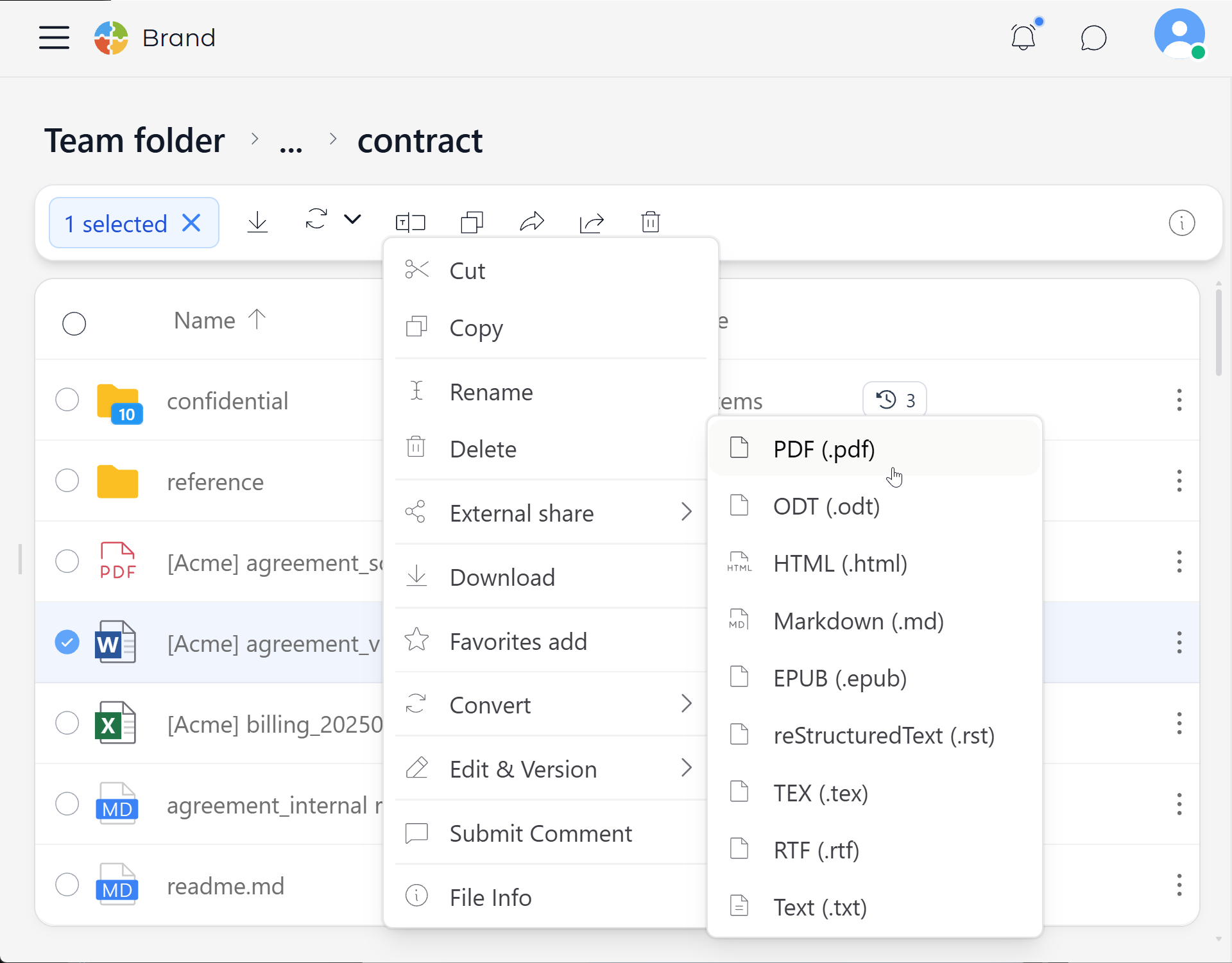
The original file is kept unchanged.
Since each format supports different capabilities, layout, fonts, tables, animations, and other elements may differ after conversion. For important documents, open the converted file to check the result.
Formats Supported in the Web Conversion Screen
Conversions That Work Regardless of Server Installation
The following formats are processed in the web browser, so they work even without a dedicated document conversion program on the server.
| Original format | Convertible formats |
|---|---|
| CSV | TSV, JSON, HTML, Markdown, SQL, XML |
| TSV | CSV, JSON, HTML, Markdown, SQL, XML |
| Markdown | HTML, TXT |
| HTML | Markdown, TXT |
Conversions Processed on the Server
The following conversions are processed on the SetFN server. The formats you can choose from depend on the programs installed on the server.
| Category | Input formats | Representative output formats |
|---|---|---|
| Documents | DOC, DOCX, ODT, RTF, TXT | PDF, DOCX, ODT, HTML, TXT |
| Markup documents | Markdown, HTML, EPUB, RST, TeX, Org, AsciiDoc | PDF, DOCX, Markdown, HTML, EPUB, RST, ODT, TeX, RTF, TXT |
| TXT, DOCX, ODT, HTML | ||
| Presentations | PPT, PPTX, ODP | PDF, HTML, PPTX |
| Spreadsheets | XLS, XLSX, ODS, CSV | CSV, XLSX, PDF, HTML, TXT |
| Images | JPG/JPEG, PNG, WebP, HEIC/HEIF, TIFF/TIF, GIF, BMP, AVIF | JPG/JPEG, PNG, WebP, TIFF |
| Audio/video | MP3, WAV, OGG, FLAC, M4A, AAC, MP4, MKV, AVI, MOV, FLV, WMV | MP3, WAV, MP4, MKV, MOV |
The table lists representative formats. The formats actually available for a given original file can be checked in the Convert menu.
| Conversion feature | Program used on the server |
|---|---|
| Office documents/PDF | LibreOffice, Pandoc, Poppler, or MuPDF |
| Images | ImageMagick and format-specific image support programs |
| Audio/video | FFmpeg |
| OCR | Tesseract OCR |
Administrators can check the installation status of the required programs under Plugins → External Libraries. If a program is not installed, the related format won't appear in the Convert menu.
Extracting Text from Images (OCR)
You can read text visible in images and PDFs and save it as a .txt file. If an administrator has configured the AI review feature, an AI model can double-check the recognition results.
Good to Know
- The first line of a CSV or TSV file is used as the column names.
- If a CSV value contains a comma, that value must be enclosed in double quotes.
- If a CSV file has garbled Korean text, check that it is UTF-8 encoded.