'/%3e%3cpath%20id='cross_2'%20data-name='cross%202'%20class='cls-2'%20d='M20.612,30.43h0a5.361,5.361,0,1,0-10.723,0H0A33.709,33.709,0,0,1,30.569,0V9.75a5.361,5.361,0,1,1,0,10.723V30.43Z'%20transform='translate(67.193%200.007)%20rotate(90)'/%3e%3cpath%20id='cross_3'%20data-name='cross%203'%20class='cls-3'%20d='M20.612,30.43h0a5.361,5.361,0,1,0-10.723,0H0A33.709,33.709,0,0,1,30.569,0V9.75a5.361,5.361,0,1,1,0,10.723V30.43Z'%20transform='translate(67.186%2067.041)%20rotate(180)'/%3e%3cpath%20id='cross_4'%20data-name='cross%204'%20class='cls-4'%20d='M20.6,30.5h0a5.361,5.361,0,1,0-10.723,0H0A33.71,33.71,0,0,1,30.56,0V9.818a5.361,5.361,0,1,1,0,10.723V30.5Z'%20transform='translate(0%2067.041)%20rotate(-90)'/%3e%3c/svg%3e)
Filter
You can quickly find the file you want in a folder with many files. The filter only works within the folder you're currently viewing, and results are shown as soon as you type. This is different from search, which covers the entire Space.
Entering a Filter
Enter a search term in the filter input box at the top right of the folder.
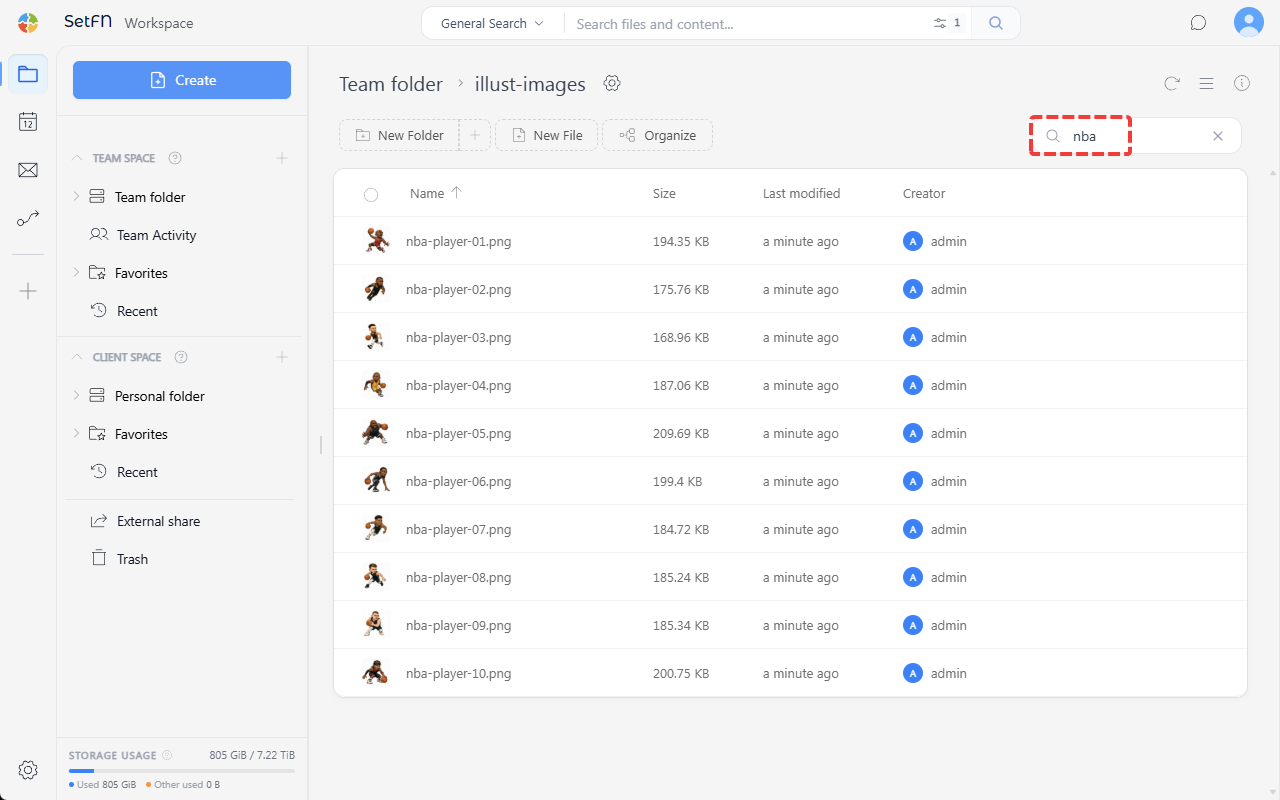
Filter Scope
You can filter based on the following criteria.
- File/folder name: Shows only items whose name contains the search term
- Author's nickname: Filters by the nickname of the person who created the file
- Extension: Filters by file extension, such as
.png
Clearing the Filter
Clearing the filter input box brings back the full list.
Good to Know
- The filter only works within the current folder.
- To search the entire workspace, use the search feature.