'/%3e%3cpath%20id='cross_2'%20data-name='cross%202'%20class='cls-2'%20d='M20.612,30.43h0a5.361,5.361,0,1,0-10.723,0H0A33.709,33.709,0,0,1,30.569,0V9.75a5.361,5.361,0,1,1,0,10.723V30.43Z'%20transform='translate(67.193%200.007)%20rotate(90)'/%3e%3cpath%20id='cross_3'%20data-name='cross%203'%20class='cls-3'%20d='M20.612,30.43h0a5.361,5.361,0,1,0-10.723,0H0A33.709,33.709,0,0,1,30.569,0V9.75a5.361,5.361,0,1,1,0,10.723V30.43Z'%20transform='translate(67.186%2067.041)%20rotate(180)'/%3e%3cpath%20id='cross_4'%20data-name='cross%204'%20class='cls-4'%20d='M20.6,30.5h0a5.361,5.361,0,1,0-10.723,0H0A33.71,33.71,0,0,1,30.56,0V9.818a5.361,5.361,0,1,1,0,10.723V30.5Z'%20transform='translate(0%2067.041)%20rotate(-90)'/%3e%3c/svg%3e)
Setting Signup Policy and Default Permissions
You can choose a signup method that fits the purpose of your space and set the default permissions granted to new users.
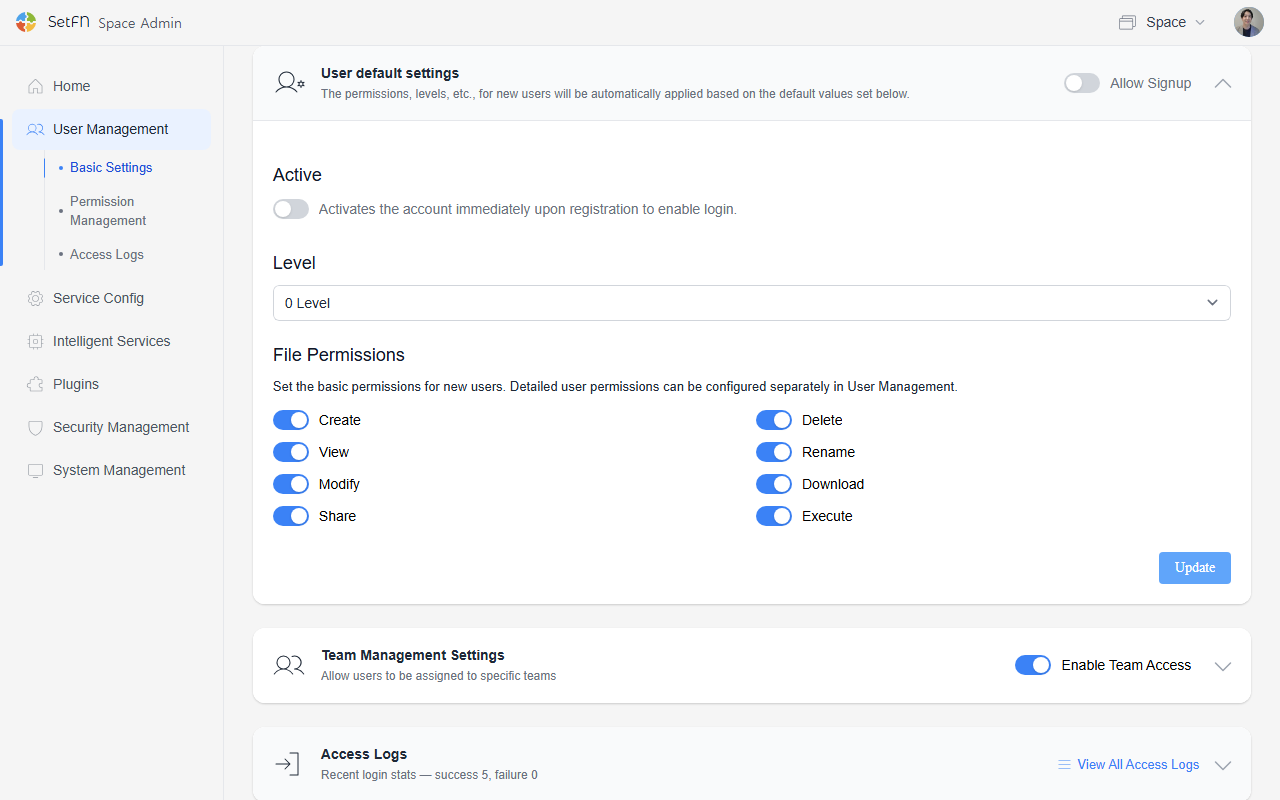
1. Setting Whether Signup Is Allowed
| Setting | Description |
|---|---|
| Allow (ON) | Anyone can sign up by visiting the space address. |
| Disallow (OFF) | Signup is not possible. The admin must create accounts directly and share them. |
For information on how to add new user accounts, see the Inviting Users document.
2. Setting the Account Activation Method
If signup is allowed, you can choose the activation method after signup.
| Method | Description |
|---|---|
| Immediate activation | Users can access the space immediately after signing up. |
| Activation after approval | Users can access the space only after an admin approves them. |
Recommended Settings by Situation
| Situation | Signup | Activation Method |
|---|---|---|
| Team/external partner collaboration | ON | Activation after approval |
| Community operation | ON | Immediate activation |
| Confidential projects | OFF | Activation after approval |
Setting Default Permissions for New Users
You can select the default permissions granted to newly signed-up users.
The permission items you can configure are as follows.
- View
- Create file
- Edit
- Delete
- Download
- Share
- Delete
- Execute
File edit, delete, and download permissions are powerful, so choose them carefully.