'/%3e%3cpath%20id='cross_2'%20data-name='cross%202'%20class='cls-2'%20d='M20.612,30.43h0a5.361,5.361,0,1,0-10.723,0H0A33.709,33.709,0,0,1,30.569,0V9.75a5.361,5.361,0,1,1,0,10.723V30.43Z'%20transform='translate(67.193%200.007)%20rotate(90)'/%3e%3cpath%20id='cross_3'%20data-name='cross%203'%20class='cls-3'%20d='M20.612,30.43h0a5.361,5.361,0,1,0-10.723,0H0A33.709,33.709,0,0,1,30.569,0V9.75a5.361,5.361,0,1,1,0,10.723V30.43Z'%20transform='translate(67.186%2067.041)%20rotate(180)'/%3e%3cpath%20id='cross_4'%20data-name='cross%204'%20class='cls-4'%20d='M20.6,30.5h0a5.361,5.361,0,1,0-10.723,0H0A33.71,33.71,0,0,1,30.56,0V9.818a5.361,5.361,0,1,1,0,10.723V30.5Z'%20transform='translate(0%2067.041)%20rotate(-90)'/%3e%3c/svg%3e)
Checking Access Logs
Check users' successful and failed login records and IP blocking history.
How to Access
Available under User Management > Access Log.
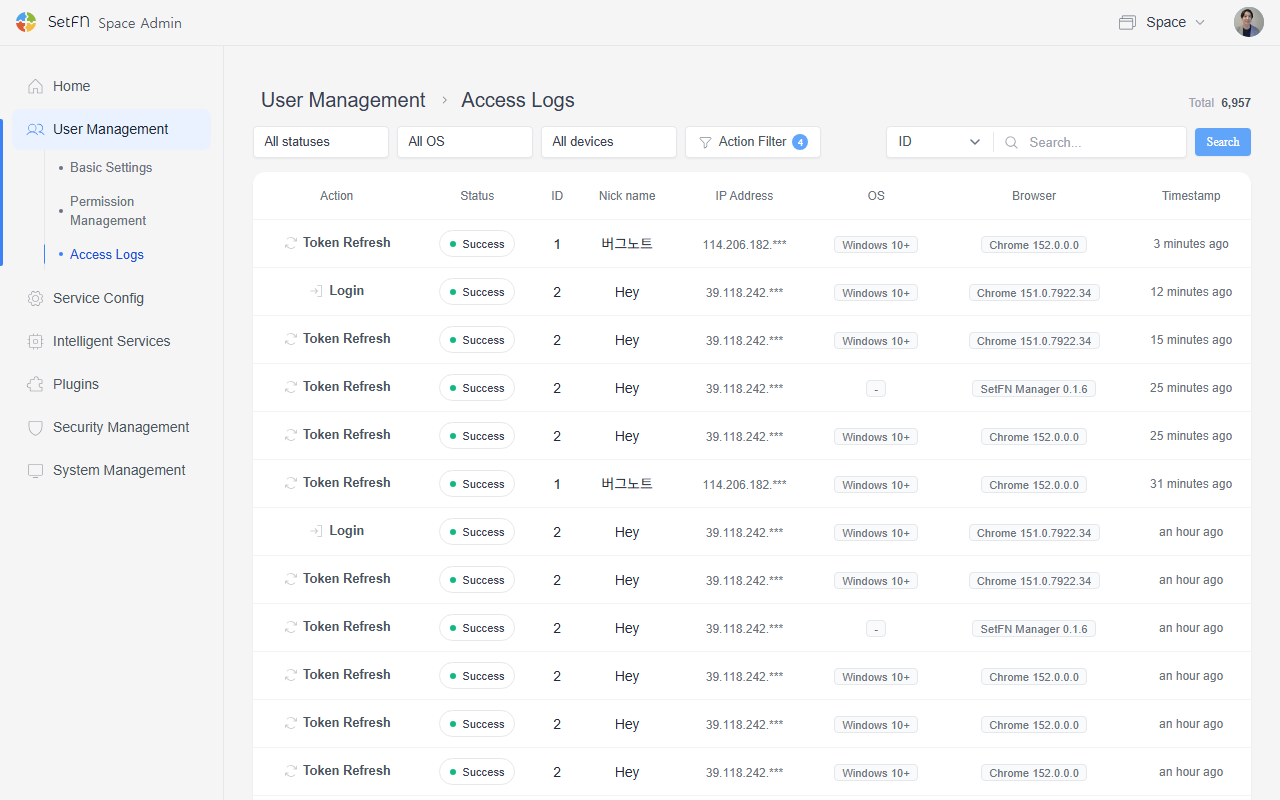
Available Information
| Item | Description |
|---|---|
| Activity | Type of access activity (login, bootstrap, etc.) |
| Status | Success / Failed |
| ID | ID of the user who attempted access |
| Nickname | User nickname |
| IP Address | IP address used for access |
| OS | Operating system of the accessing device |
| Browser | Browser used for access |
| Timestamp | Date and time of the access attempt |
Filtering and Search
- You can filter by login, logout, signup, token refresh, and session refresh using the filter next to the search box.
- You can search access logs by ID, nickname, activity, status, or IP in the search box at the top.
Good to Know
- An IP with repeated failed login attempts may be judged a security threat and blocked.
- IP blocking settings are managed in Security Settings.