'/%3e%3cpath%20id='cross_2'%20data-name='cross%202'%20class='cls-2'%20d='M20.612,30.43h0a5.361,5.361,0,1,0-10.723,0H0A33.709,33.709,0,0,1,30.569,0V9.75a5.361,5.361,0,1,1,0,10.723V30.43Z'%20transform='translate(67.193%200.007)%20rotate(90)'/%3e%3cpath%20id='cross_3'%20data-name='cross%203'%20class='cls-3'%20d='M20.612,30.43h0a5.361,5.361,0,1,0-10.723,0H0A33.709,33.709,0,0,1,30.569,0V9.75a5.361,5.361,0,1,1,0,10.723V30.43Z'%20transform='translate(67.186%2067.041)%20rotate(180)'/%3e%3cpath%20id='cross_4'%20data-name='cross%204'%20class='cls-4'%20d='M20.6,30.5h0a5.361,5.361,0,1,0-10.723,0H0A33.71,33.71,0,0,1,30.56,0V9.818a5.361,5.361,0,1,1,0,10.723V30.5Z'%20transform='translate(0%2067.041)%20rotate(-90)'/%3e%3c/svg%3e)
Configure Account & Security policies
Use Account & Security to set ID and password rules for new or updated accounts. You can also choose how long users stay signed in and how many simultaneous sign-ins are allowed.
Before you begin
- Required role: administrator
- Configure attack detection, automatic blocks, and new-device approval separately under Security Settings.
Open Account & Security
- Open the administrator page.
- Select
User Managementfrom the left menu. - Select
Account & Securityfrom the submenu.
The page contains Login ID format, Password rules, and Session policy cards. Select the arrow on a card to expand its settings.
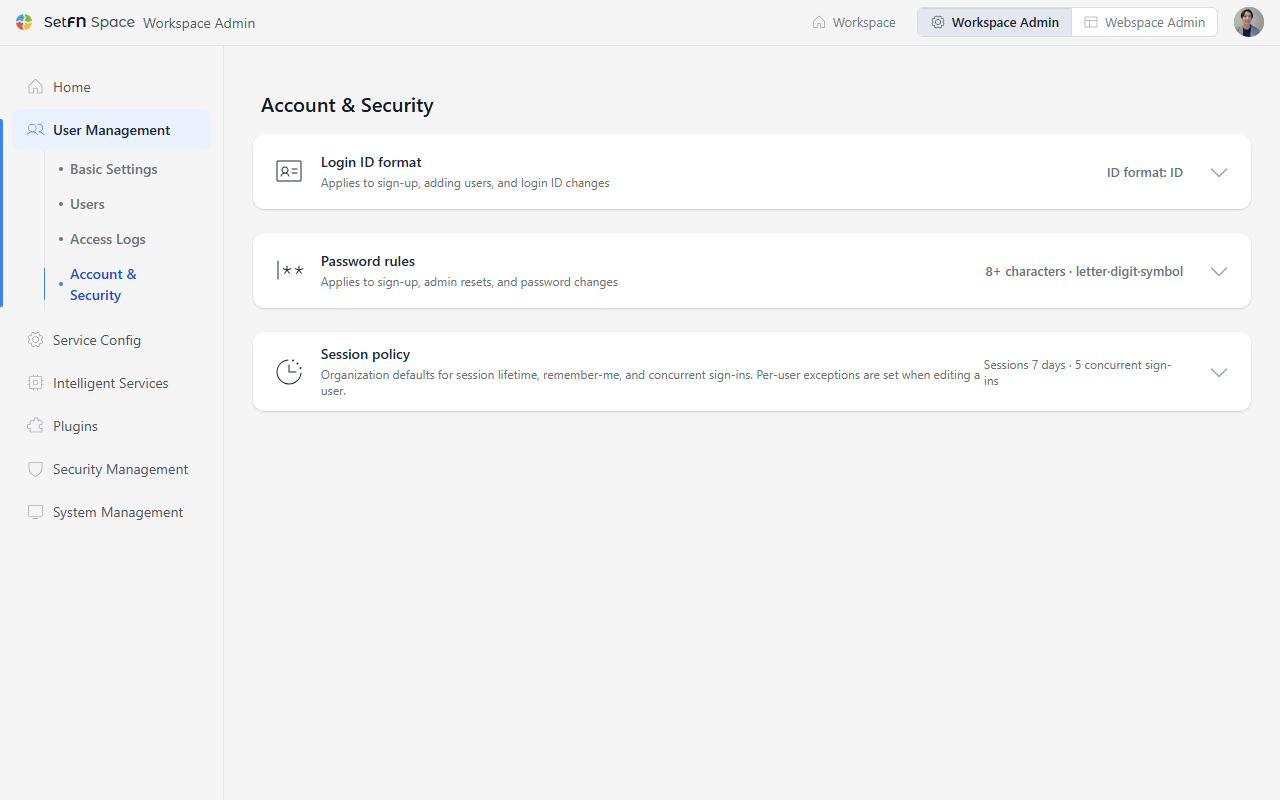
Set the login ID format
| Option | Applied rule |
|---|---|
ID | Enter 4–100 characters using letters, digits, _ . @ -. Start with a letter or digit. Email addresses are also accepted. |
Email address only | Use an email address such as name@example.com as the login ID. |
Select Update to save. The format applies to future sign-ups, accounts added by an administrator, and ID changes. Existing IDs stay the same and can still be used to sign in.
Set password rules
Length and rotation
| Item | Product default | Range and behavior |
|---|---|---|
Minimum length (characters) | 8 | 4–128 characters |
Change interval (days) | 0 | 0–3650 days. Set 0 for no expiration. |
Reuse prevention count | 0 | 0–12 passwords. Set 0 to allow reuse. |
Requirements
| Item | Product default |
|---|---|
Require a letter (any case) | On |
Require an uppercase letter | Off |
Require a lowercase letter | Off |
Require a digit | On |
Require a special character | On |
Must not contain the login ID | Off |
Requiring an uppercase or lowercase letter also enables Require a letter (any case). Stricter rules apply to future sign-ups and password setup or changes. Current passwords do not change immediately.
Set the session policy
Set how long users stay signed in and how many simultaneous sign-ins your organization allows.
| Item | Product default | Description |
|---|---|---|
Access token lifetime (minutes) | 30 minutes | 5–1440 minutes. A shorter lifetime reduces how long a stolen token remains valid. |
Session lifetime (days) | 7 days | 1–365 days. How long users stay signed in without activity when they have not selected Remember me. |
Concurrent sign-ins | 5 | 1–100 devices. The oldest session is signed out when the limit is exceeded. |
Remember me | On | Shows the Remember me option on the sign-in screen. |
Remember-me lifetime (days) | 30 days | 1–365 days. How long users stay signed in without activity when they have selected Remember me. |
If the server has its own settings, they take priority over the product defaults until you first save this policy.
Changes apply when a user next signs in or their sign-in session is renewed. Access tokens already issued remain valid until they expire. To apply different settings to one user, edit their account under Users.