'/%3e%3cpath%20id='cross_2'%20data-name='cross%202'%20class='cls-2'%20d='M20.612,30.43h0a5.361,5.361,0,1,0-10.723,0H0A33.709,33.709,0,0,1,30.569,0V9.75a5.361,5.361,0,1,1,0,10.723V30.43Z'%20transform='translate(67.193%200.007)%20rotate(90)'/%3e%3cpath%20id='cross_3'%20data-name='cross%203'%20class='cls-3'%20d='M20.612,30.43h0a5.361,5.361,0,1,0-10.723,0H0A33.709,33.709,0,0,1,30.569,0V9.75a5.361,5.361,0,1,1,0,10.723V30.43Z'%20transform='translate(67.186%2067.041)%20rotate(180)'/%3e%3cpath%20id='cross_4'%20data-name='cross%204'%20class='cls-4'%20d='M20.6,30.5h0a5.361,5.361,0,1,0-10.723,0H0A33.71,33.71,0,0,1,30.56,0V9.818a5.361,5.361,0,1,1,0,10.723V30.5Z'%20transform='translate(0%2067.041)%20rotate(-90)'/%3e%3c/svg%3e)
Level Management
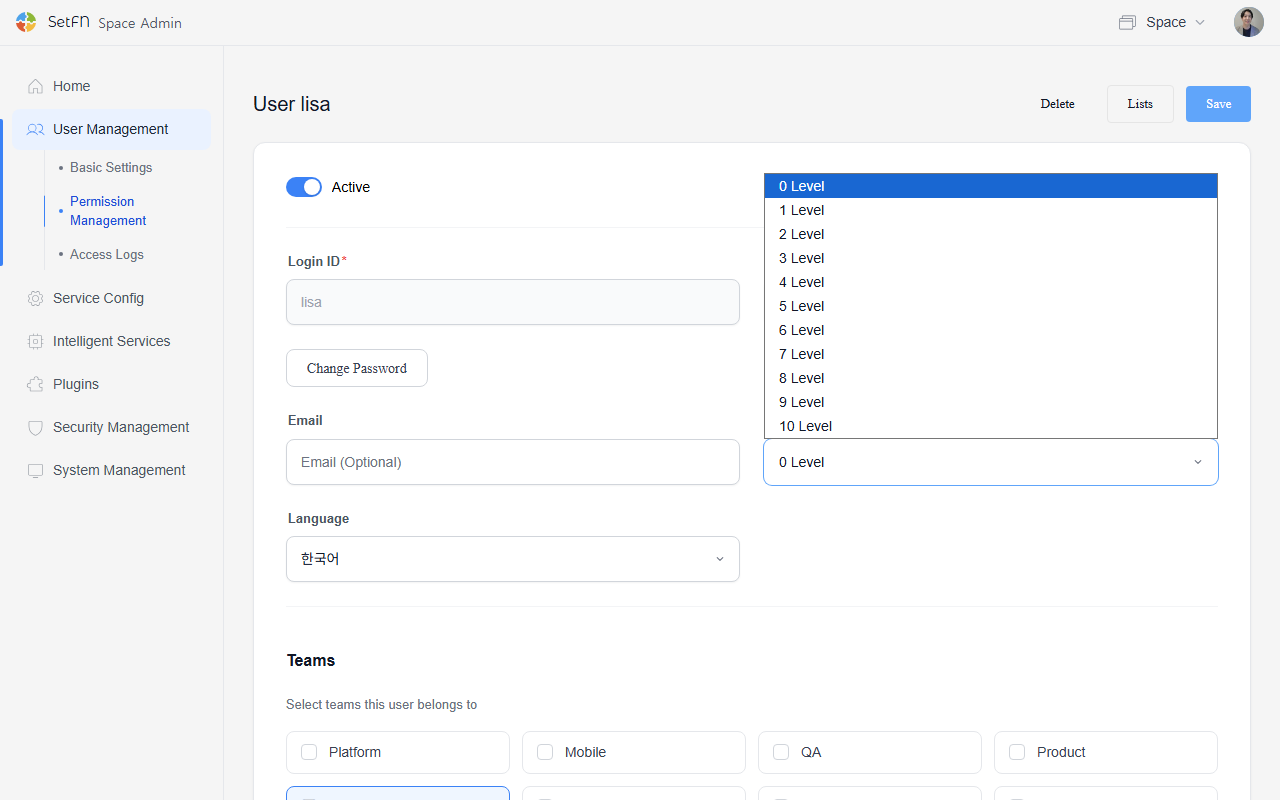
You can grant levels to users in your space. You can manage the scope of information users can access based on their position or security clearance.
Granting a Level to a User
- Go to
User Management>User List. - Find the user you want to grant a level to and click the edit icon (✏️️).
- In the Level field, choose a level from 0 to 10.
- Click the Save button.
Setting Up Level-Based Folders
You can divide folder access permissions by level. Higher levels can access more folders. See the link below for how to set up level-based folders.
Good to Know
- Admins can access all folders regardless of level.
- Folders without a level assigned can be accessed by all users.
- Levels can be changed at any time, and folder access permissions update immediately upon change.
- Using levels and teams together allows for finer-grained access control.