'/%3e%3cpath%20id='cross_2'%20data-name='cross%202'%20class='cls-2'%20d='M20.612,30.43h0a5.361,5.361,0,1,0-10.723,0H0A33.709,33.709,0,0,1,30.569,0V9.75a5.361,5.361,0,1,1,0,10.723V30.43Z'%20transform='translate(67.193%200.007)%20rotate(90)'/%3e%3cpath%20id='cross_3'%20data-name='cross%203'%20class='cls-3'%20d='M20.612,30.43h0a5.361,5.361,0,1,0-10.723,0H0A33.709,33.709,0,0,1,30.569,0V9.75a5.361,5.361,0,1,1,0,10.723V30.43Z'%20transform='translate(67.186%2067.041)%20rotate(180)'/%3e%3cpath%20id='cross_4'%20data-name='cross%204'%20class='cls-4'%20d='M20.6,30.5h0a5.361,5.361,0,1,0-10.723,0H0A33.71,33.71,0,0,1,30.56,0V9.818a5.361,5.361,0,1,1,0,10.723V30.5Z'%20transform='translate(0%2067.041)%20rotate(-90)'/%3e%3c/svg%3e)
Team Space
Team Space is a shared work space used together by team members. Manage your team's files and workflow through Team Folder, Team Activity, Favorites, and Recent Documents.
What Is Team Space?
Team Space is a space where multiple users collaborate based on the same folders and files. It stores materials that the team needs to manage together, such as project documents, meeting minutes, contracts, reports, and data files.
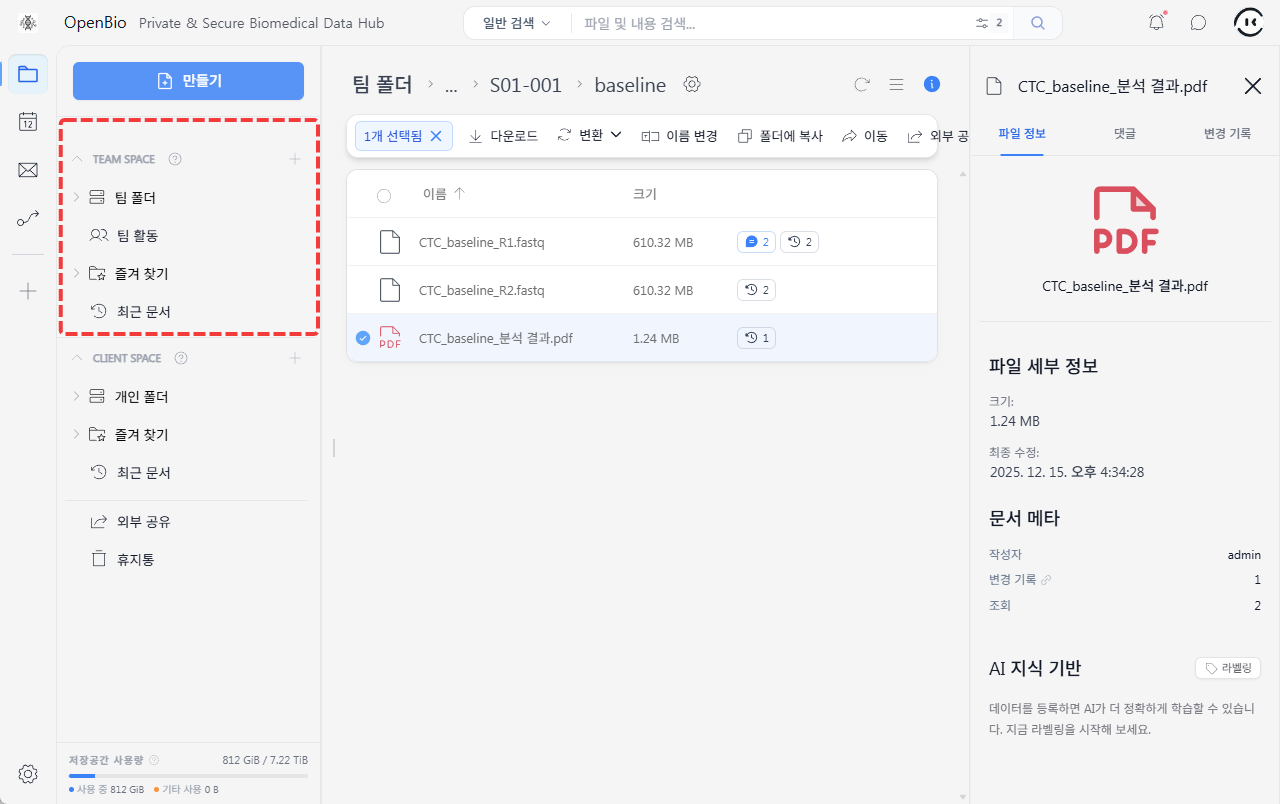
Files in Team Space may be visible or hidden depending on team permissions and folder permissions. Users can only open folders and files they have permission to access.
Team Space Menu
| Item | Description |
|---|---|
Team Folder | Manage files and folders shared by the team. |
Team Activity | Check team members' file activity, comments, and activity history. |
Favorites | View team folders or files you use often. |
Recent Documents | Check recently created or modified team documents. |
Comments/Mentions/Chat | Exchange feedback with team members on a per-file basis. |
Team File and Folder URLs
Files and folders in Team Space can be opened directly via URL. When a team member needs to check the same document or folder, sharing the file URL or folder URL can reduce the steps needed to navigate to it.
However, a URL does not substitute for access permission. Even if you know the URL, you cannot access the team folder or file without permission.
Team Space and Permissions
Access to files in Team Space is affected by permission settings.
| Permission factor | Description |
|---|---|
| Team permission | The folders you can access may vary depending on the team you belong to. |
| Level permission | The scope of actions such as viewing or editing may vary depending on your user level. |
| Folder permission | Access to a specific folder can be restricted to certain users or teams. |
When sharing an important document via URL, make sure the recipient has permission to open the file.
Sharing with External Users
When you need to deliver a team file to an external user, use an external share link instead of a regular file URL. External share links let you manage separate conditions such as access scope and expiration.
Good to Know
- Team Space is a shared space for team-based collaboration.
- Team files and folders can be opened directly via URL.
- Even if you know the URL, you cannot access it without permission.
- Use an external share link when sharing with external users.