'/%3e%3cpath%20id='cross_2'%20data-name='cross%202'%20class='cls-2'%20d='M20.612,30.43h0a5.361,5.361,0,1,0-10.723,0H0A33.709,33.709,0,0,1,30.569,0V9.75a5.361,5.361,0,1,1,0,10.723V30.43Z'%20transform='translate(67.193%200.007)%20rotate(90)'/%3e%3cpath%20id='cross_3'%20data-name='cross%203'%20class='cls-3'%20d='M20.612,30.43h0a5.361,5.361,0,1,0-10.723,0H0A33.709,33.709,0,0,1,30.569,0V9.75a5.361,5.361,0,1,1,0,10.723V30.43Z'%20transform='translate(67.186%2067.041)%20rotate(180)'/%3e%3cpath%20id='cross_4'%20data-name='cross%204'%20class='cls-4'%20d='M20.6,30.5h0a5.361,5.361,0,1,0-10.723,0H0A33.71,33.71,0,0,1,30.56,0V9.818a5.361,5.361,0,1,1,0,10.723V30.5Z'%20transform='translate(0%2067.041)%20rotate(-90)'/%3e%3c/svg%3e)
Recent Documents
You can view files you've recently accessed or modified directly from the sidebar. Files from the last 2 weeks are shown.
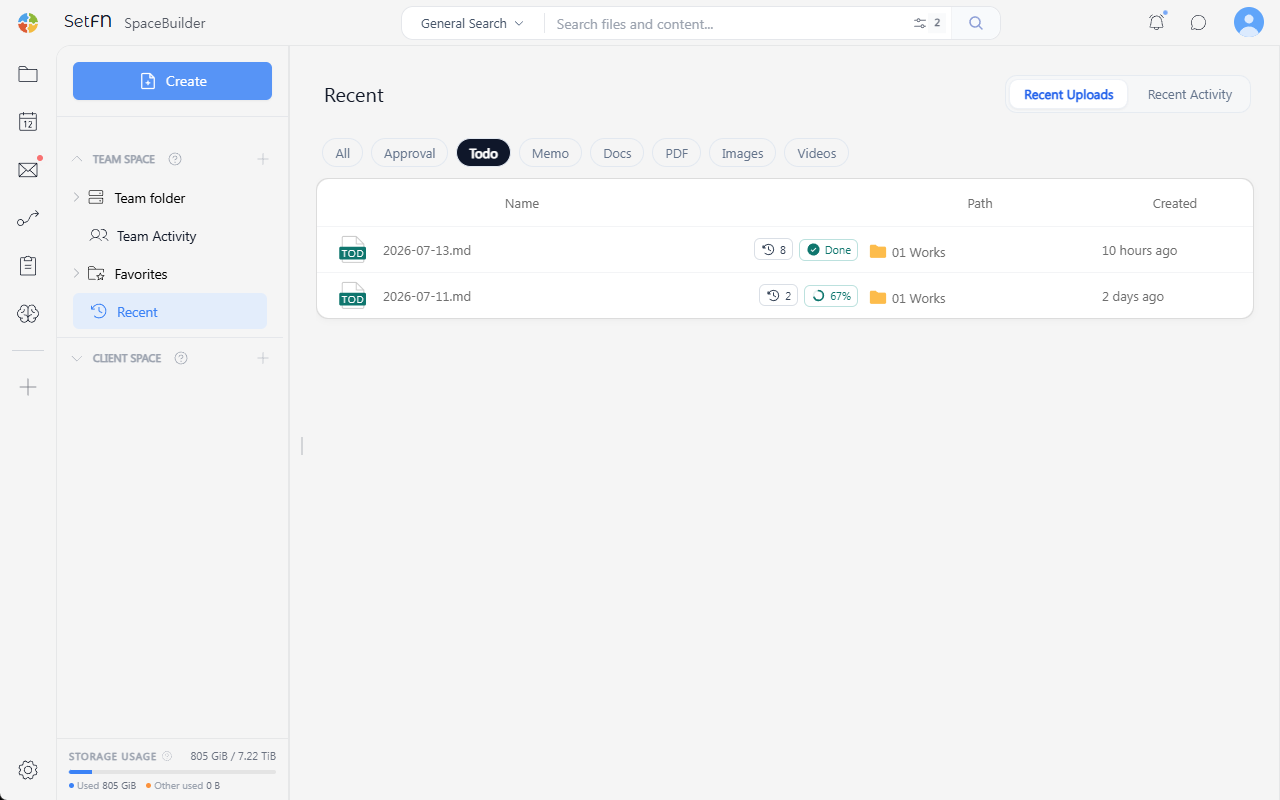
Team Recent Documents vs. Personal Recent Documents
| Category | Description |
|---|---|
| Team Space → Recent Documents | Recent files created or modified by the entire team in the team folder. Helps you understand which files team members are looking at. |
| Client Space → Recent Documents | Recent files you created or modified in your personal folder. Useful for quickly returning to previous work files. |
File Type Tabs
You can filter by file type using the tabs at the top.
| Tab | What's shown |
|---|---|
| All | All files |
| Approval | Approval template files |
| To-do | To-do template files |
| Memo | Memo template files |
| Document | Text-based documents (Markdown, HTML, etc.) |
| PDF files | |
| Image | Image files |
| Video | Video files |
Recent Uploads / Recent Activity
You can switch the view mode using the tab in the top-right corner.
| Tab | Description |
|---|---|
| Recent Uploads | List of recently uploaded files |
| Recent Activity | List of files that had activity such as uploads/modifications |