'/%3e%3cpath%20id='cross_2'%20data-name='cross%202'%20class='cls-2'%20d='M20.612,30.43h0a5.361,5.361,0,1,0-10.723,0H0A33.709,33.709,0,0,1,30.569,0V9.75a5.361,5.361,0,1,1,0,10.723V30.43Z'%20transform='translate(67.193%200.007)%20rotate(90)'/%3e%3cpath%20id='cross_3'%20data-name='cross%203'%20class='cls-3'%20d='M20.612,30.43h0a5.361,5.361,0,1,0-10.723,0H0A33.709,33.709,0,0,1,30.569,0V9.75a5.361,5.361,0,1,1,0,10.723V30.43Z'%20transform='translate(67.186%2067.041)%20rotate(180)'/%3e%3cpath%20id='cross_4'%20data-name='cross%204'%20class='cls-4'%20d='M20.6,30.5h0a5.361,5.361,0,1,0-10.723,0H0A33.71,33.71,0,0,1,30.56,0V9.818a5.361,5.361,0,1,1,0,10.723V30.5Z'%20transform='translate(0%2067.041)%20rotate(-90)'/%3e%3c/svg%3e)
Build APIs and deploy a database
After creating a schema file (.sfn), turn the design into a working service. API Build prepares create, read, update, and delete APIs for every table and shows who can use each address.
You can also connect custom query APIs, static file APIs, and real-time events to the same service.
Before you begin
- Required permission: A user with database permission
- Prerequisite: Create a schema file (
.sfn) first.
Open API Build
Select the API Build tab at the top of the schema screen to review the automatically generated APIs for each table.
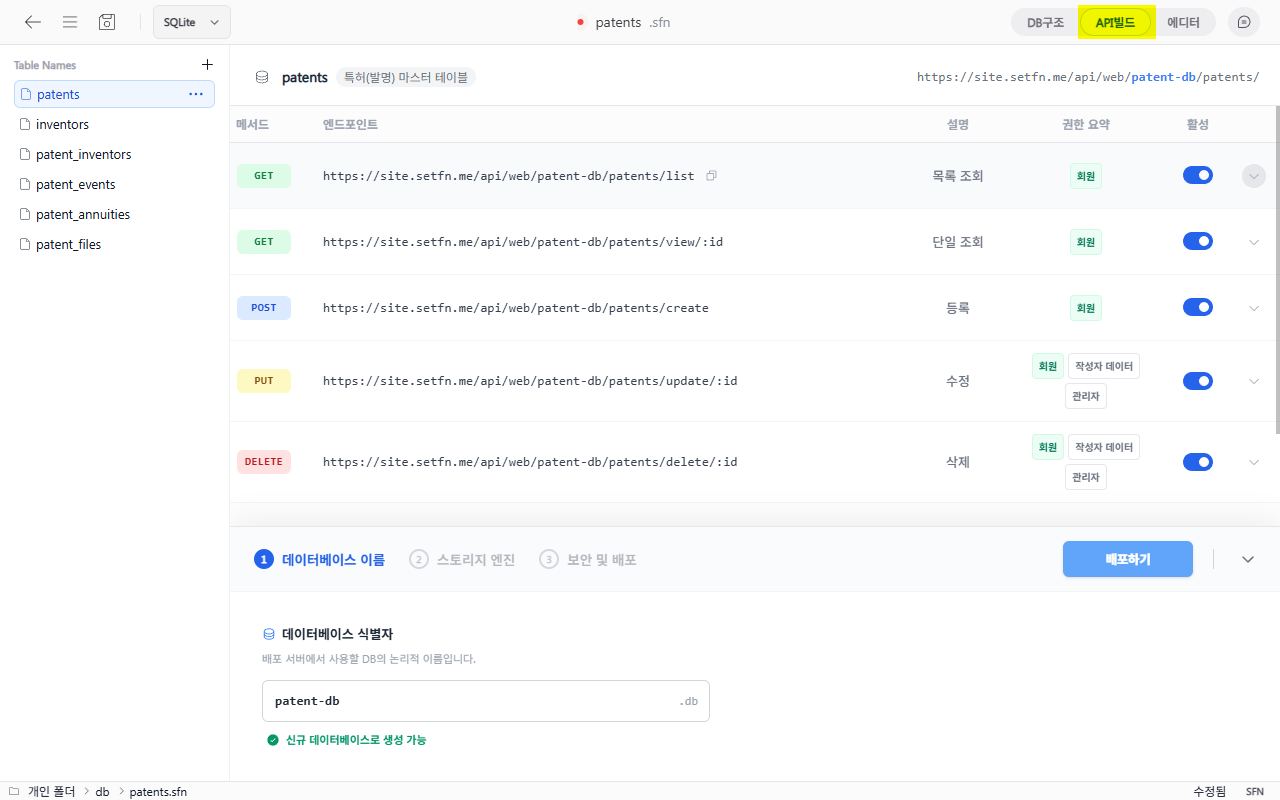
Automatically generated APIs
Five APIs are generated for each table by default. You can also add custom APIs when needed.
| Method | Endpoint | Description |
|---|---|---|
| GET | .../list | Retrieve a list |
| GET | .../view/:id | Retrieve one record |
| POST | .../create | Create a record |
| PUT | .../update/:id | Update a record |
| DELETE | .../delete/:id | Delete a record |
Use Add new API to define an API with the required query and response shape. Use Add static file API to serve JSON, XML, HTML, image, and binary files from the workspace with the appropriate file type.
Feature endpoints control permissions for service-wide capabilities such as real-time sockets, file and image uploads, and AI connections.
Building APIs beyond CRUD with a custom endpoint
When the 5 auto-generated APIs (list/view/create/update/delete) aren't enough, clicking Add new API lets you define behavior in much finer detail.
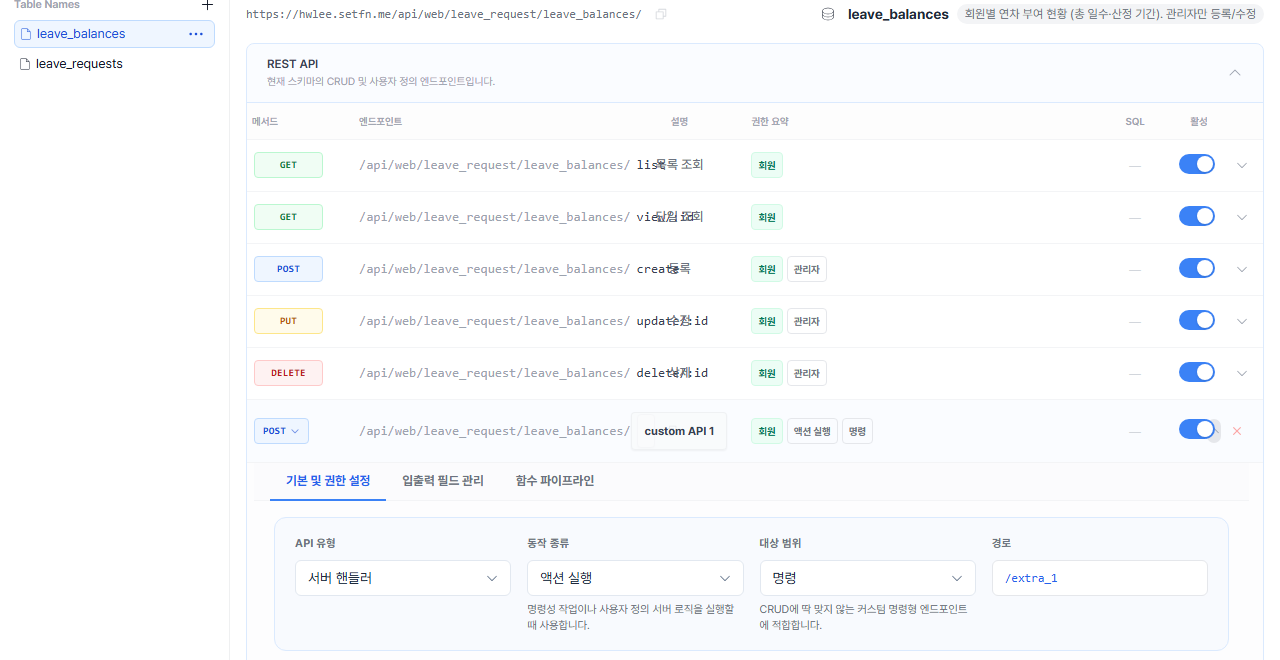
Action kinds
Beyond the 5 basic CRUD actions, the Action kind dropdown also offers:
| Action kind | Meaning |
|---|---|
| Run action | For imperative, command-style endpoints that don't fit CRUD |
| Stats | Returns statistical results like counts, sums, or aggregates |
| Bulk | Processes multiple records in one call |
| Export | Downloads query results as a file |
Target scope is one of Collection (the whole table or multiple records, usually a path without :id), Single item (one specific record), or Command (a custom, command-style endpoint that doesn't fit CRUD).
Permissions use the same 3 tiers as the REST API
Custom endpoint permissions work the same way as the auto-generated APIs. The screen itself explains each option clearly.
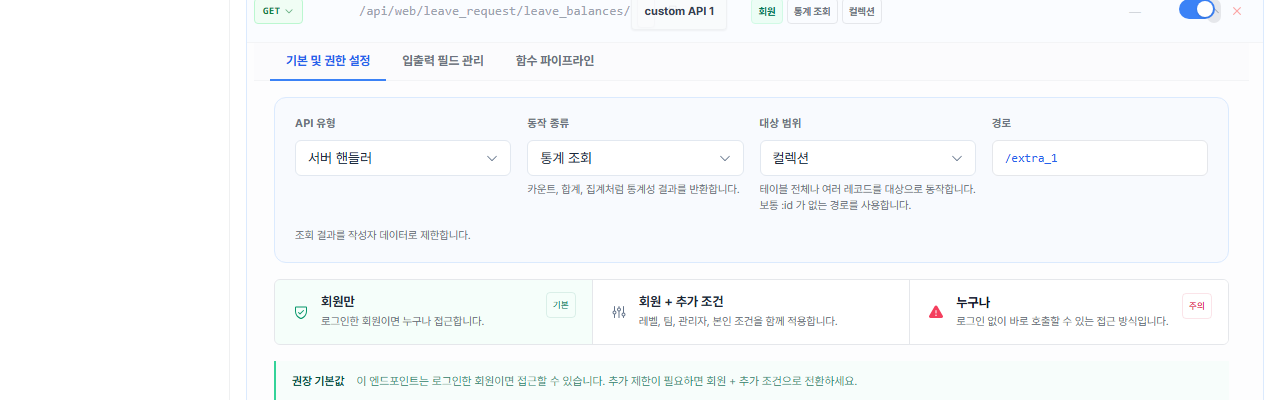
Choosing Member + extra conditions lets you combine level, team, admin status, and owner (self) conditions — the same way you'd restrict "level 2 or higher" or "sales team only" on an auto-generated REST endpoint, you can apply it to a custom endpoint too.
Writing raw SQL
On the Function pipeline tab, turning on Custom query control opens an editor where you write the base SQL query this endpoint runs.
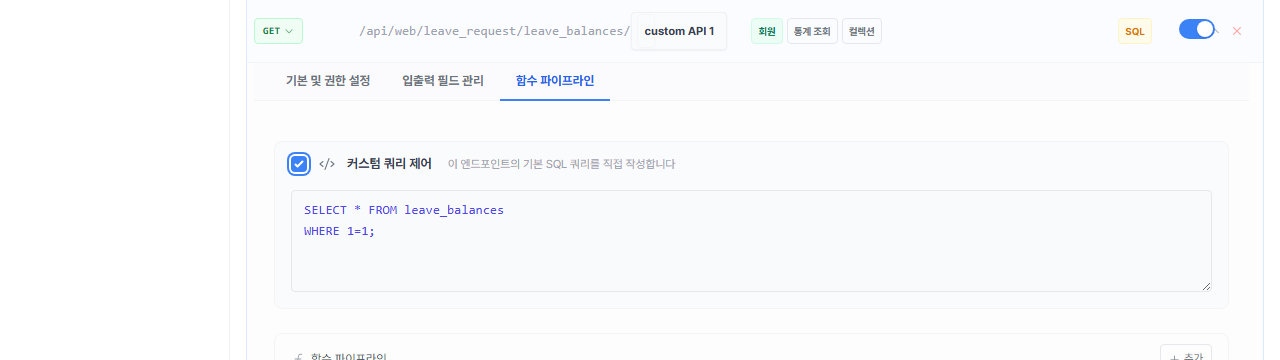
The REST API list's SQL column also shows a badge marking that this endpoint runs a query you wrote directly. Conditions the auto-generated APIs can't express — like "reject if this member has already created 3 or more rows today" — can only be built with this SQL editor.
Controlling flow with the function pipeline
Without writing SQL, you can also add pre-built functions to the Function pipeline in sequence to change how a request is processed. Functions fall into three stages: input processing, DB processing, and output processing.
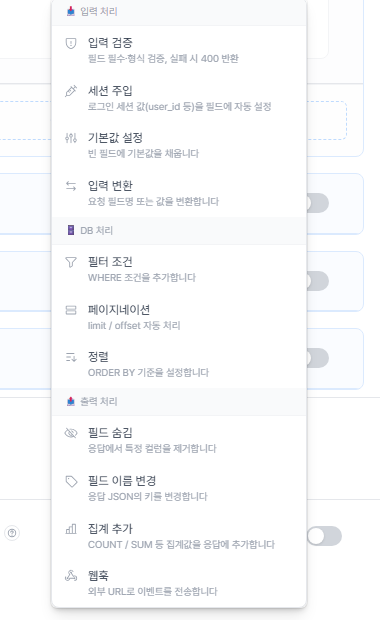
| Category | Function | Description |
|---|---|---|
| Input processing | Input validation | Validates required fields/format, returns 400 on failure |
| Input processing | Session injection | Auto-fills a field with a session value (e.g. user_id) |
| Input processing | Default values | Fills empty fields with a default value |
| Input processing | Input transform | Transforms request field names or values |
| DB processing | Filter condition | Adds a WHERE condition |
| DB processing | Pagination | Handles limit/offset automatically |
| DB processing | Sorting | Sets the ORDER BY clause |
| Output processing | Hide field | Removes a column from the response |
| Output processing | Rename field | Renames a key in the response JSON |
| Output processing | Add aggregate | Adds an aggregate value like COUNT/SUM to the response |
| Output processing | Webhook | Sends the event to an external URL |
Configure permissions
Configure access separately for each API. A member here is an existing workspace member account. You do not need to create another sign-in or authentication system because workspace members, levels, and teams are connected directly to API permissions.
| Permission | Description |
|---|---|
| Member | Any signed-in member can call the API |
| Member + additional conditions | The member must also satisfy conditions such as level, team, or administrator status |
| Anyone (except write operations) | Can be called without signing in, but create, update, and delete requests are not allowed |
Deploy
Enter the deployment information as follows.
- Database name: Enter the logical DB name to use on the deployment server in English.
- Storage engine: Select SQLite3, PostgreSQL, MySQL, or MariaDB. For an external DB, also enter the host, port, DB name, user, and password. MySQL and MariaDB use an InnoDB-based configuration.
- Security and deployment:
| Item | Description |
|---|---|
| Client deployment path | Select where the sample frontend output (index.html, test.html, README, and other files) will be created |
| Allowed IP addresses | Specify an allowlist of IP addresses that may access the APIs |
After reviewing all fields, select Deploy to prepare the database and APIs. If you selected a client deployment path, WebSpace also creates a sample interface for testing the APIs. Continue with Use the frontend example to modify the interface.
API request examples
The following examples use the user_profile table.
GET  /api/web/{dbName}/user_profile/list
GET  /api/web/{dbName}/user_profile/view/{id}
POST /api/web/{dbName}/user_profile/create
PUT  /api/web/{dbName}/user_profile/update/{id}
DELETE /api/web/{dbName}/user_profile/delete/{id}
Create (POST) request example:
POST /api/web/{dbName}/user_profile/create
Content-Type: application/json

{
  "email": "user@example.com",
  "is_active": true
}
Deployment and overwriting
Overwriting a schema whose database already contains data follows the server deployment policy. Your organization can prohibit it or restrict it to administrators and designated deployment operators. Before changing the structure, review affected columns and APIs and confirm backup and recovery procedures.
Good to know
- APIs use SetFN sign-in sessions for authentication. Unauthenticated requests are rejected unless the API permission is set to
Anyone. - Changing the schema structure also updates its API endpoints. Check compatibility with existing integrations.
- SQLite3 data is stored in the server's WebSpace storage. External-engine data is stored in the database configured by the administrator.
- Use list filters, sorting, and page sizes only within the query ranges allowed by the server.
- For calls from an external site, also check the administrator's allowed origins and CSP settings.