'/%3e%3cpath%20id='cross_2'%20data-name='cross%202'%20class='cls-2'%20d='M20.612,30.43h0a5.361,5.361,0,1,0-10.723,0H0A33.709,33.709,0,0,1,30.569,0V9.75a5.361,5.361,0,1,1,0,10.723V30.43Z'%20transform='translate(67.193%200.007)%20rotate(90)'/%3e%3cpath%20id='cross_3'%20data-name='cross%203'%20class='cls-3'%20d='M20.612,30.43h0a5.361,5.361,0,1,0-10.723,0H0A33.709,33.709,0,0,1,30.569,0V9.75a5.361,5.361,0,1,1,0,10.723V30.43Z'%20transform='translate(67.186%2067.041)%20rotate(180)'/%3e%3cpath%20id='cross_4'%20data-name='cross%204'%20class='cls-4'%20d='M20.6,30.5h0a5.361,5.361,0,1,0-10.723,0H0A33.71,33.71,0,0,1,30.56,0V9.818a5.361,5.361,0,1,1,0,10.723V30.5Z'%20transform='translate(0%2067.041)%20rotate(-90)'/%3e%3c/svg%3e)
Developer Tip 2: Code Converter
If your own project needs data model code, you can convert the table and column information defined in the schema directly into a data model class or entity code in the programming language you want, and bring it into your project. It supports 10 languages, including TypeScript, Python, and Java, and you can save the converted code to a file and apply it directly to your project.
Opening the Code converter
Click the Editor tab at the top of the schema screen, then select CODE Converter on the left.
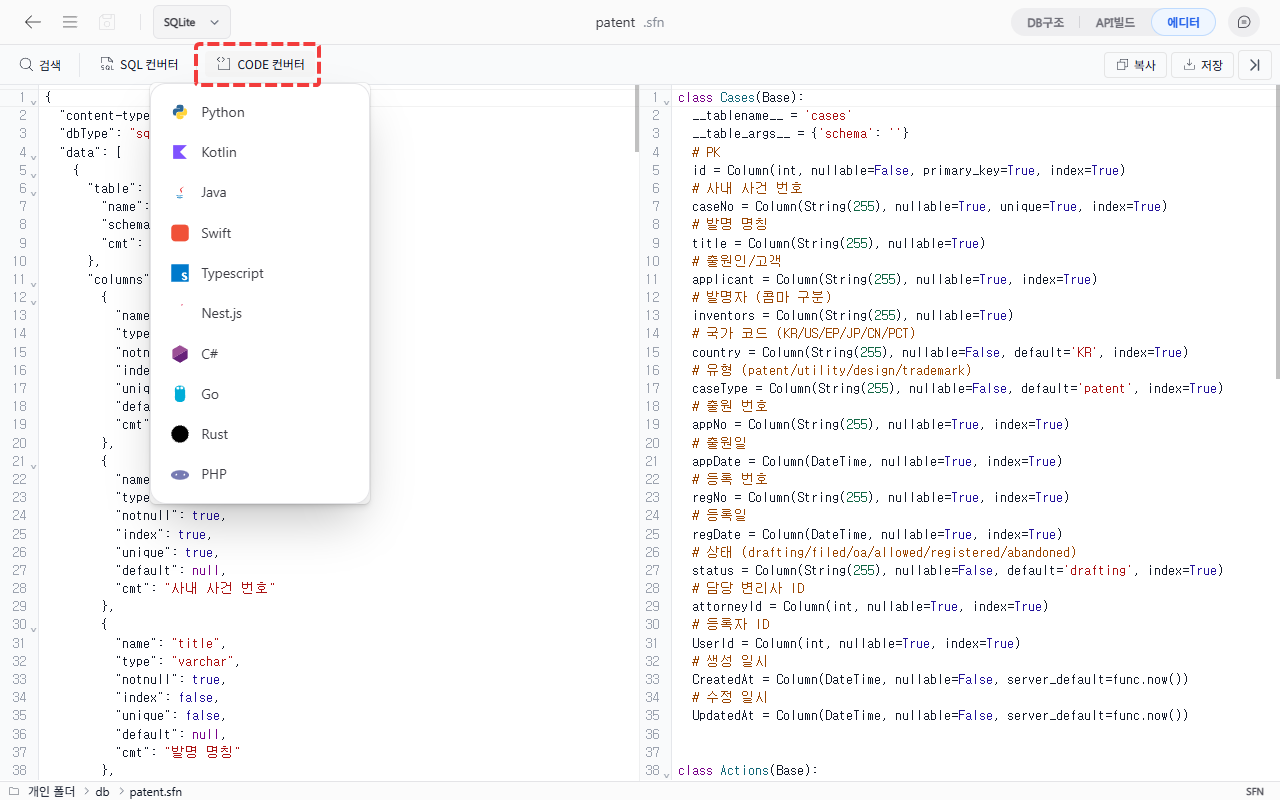
Selecting a programming language
Select the programming language to use. Once selected, code converted into that language is shown on the right.
Checking the conversion result
Check the converted code. Below are conversion examples for TypeScript and Nest.js.
TypeScript interface:
export interface UserProfile {
    userId: number;
    email: string;
    preferences?: any;
    isActive: boolean;
    createdAt: Date;
}
Nest.js entity:
@Entity({
  name: 'user_profile',
  schema: 'public',
})
export class UserProfile {
  @Index()
  @PrimaryGeneratedColumn({
    comment: 'Unique user ID',
    name: 'user_id',
    unsigned: true,
  })
  userId: number;

  @Index()
  @Column({ name: 'email', type: 'varchar', length: 255, unique: true })
  email: string;
}
Saving the code file
Use the Copy button at the top right of the code area to copy the code, or the Save button to save it as a file with the extension matching your selected language.
Supported programming languages
| Language | Conversion format |
|---|---|
| Python | Data modeling class |
| Kotlin | Data model class |
| Java | Java classes and models |
| Swift | Swift data model |
| TypeScript | TypeScript interface |
| Nest.js | Nest.js entity |
| C# | C# classes and entities |
| Go | Go struct |
| Rust | Rust struct |
| PHP | PHP classes and data models |
Good to know
- The converted code is generated based on the current state of the schema. You need to convert again after changing the schema for the changes to be reflected.
- Naming conventions (camelCase, snake_case, etc.) are automatically applied per language.