'/%3e%3cpath%20id='cross_2'%20data-name='cross%202'%20class='cls-2'%20d='M20.612,30.43h0a5.361,5.361,0,1,0-10.723,0H0A33.709,33.709,0,0,1,30.569,0V9.75a5.361,5.361,0,1,1,0,10.723V30.43Z'%20transform='translate(67.193%200.007)%20rotate(90)'/%3e%3cpath%20id='cross_3'%20data-name='cross%203'%20class='cls-3'%20d='M20.612,30.43h0a5.361,5.361,0,1,0-10.723,0H0A33.709,33.709,0,0,1,30.569,0V9.75a5.361,5.361,0,1,1,0,10.723V30.43Z'%20transform='translate(67.186%2067.041)%20rotate(180)'/%3e%3cpath%20id='cross_4'%20data-name='cross%204'%20class='cls-4'%20d='M20.6,30.5h0a5.361,5.361,0,1,0-10.723,0H0A33.71,33.71,0,0,1,30.56,0V9.818a5.361,5.361,0,1,1,0,10.723V30.5Z'%20transform='translate(0%2067.041)%20rotate(-90)'/%3e%3c/svg%3e)
Building an Internal Team Web Service
You can build a database and screens and use them as a web service for internal team use only. Without exposing anything externally, you open it directly inside a workspace folder using Folder web view.
Build flow
- Build a database structure: Define the table structure with a schema (.sfn).
- Build the API and deploy the database: A CRUD API is automatically generated based on the defined structure.
- Check the frontend sample: Use the automatically generated
index.htmlas-is, or refine it with AI to finish the screen. - Move the finished folder (
index.html,style.css, etc.) into a specific folder in the workspace, and switch the view mode to Folder web view.
Once you enter a folder configured for web view like this, the screen built with index.html appears immediately. This screen is connected to the DB, so you can look up, create, and update actual data.
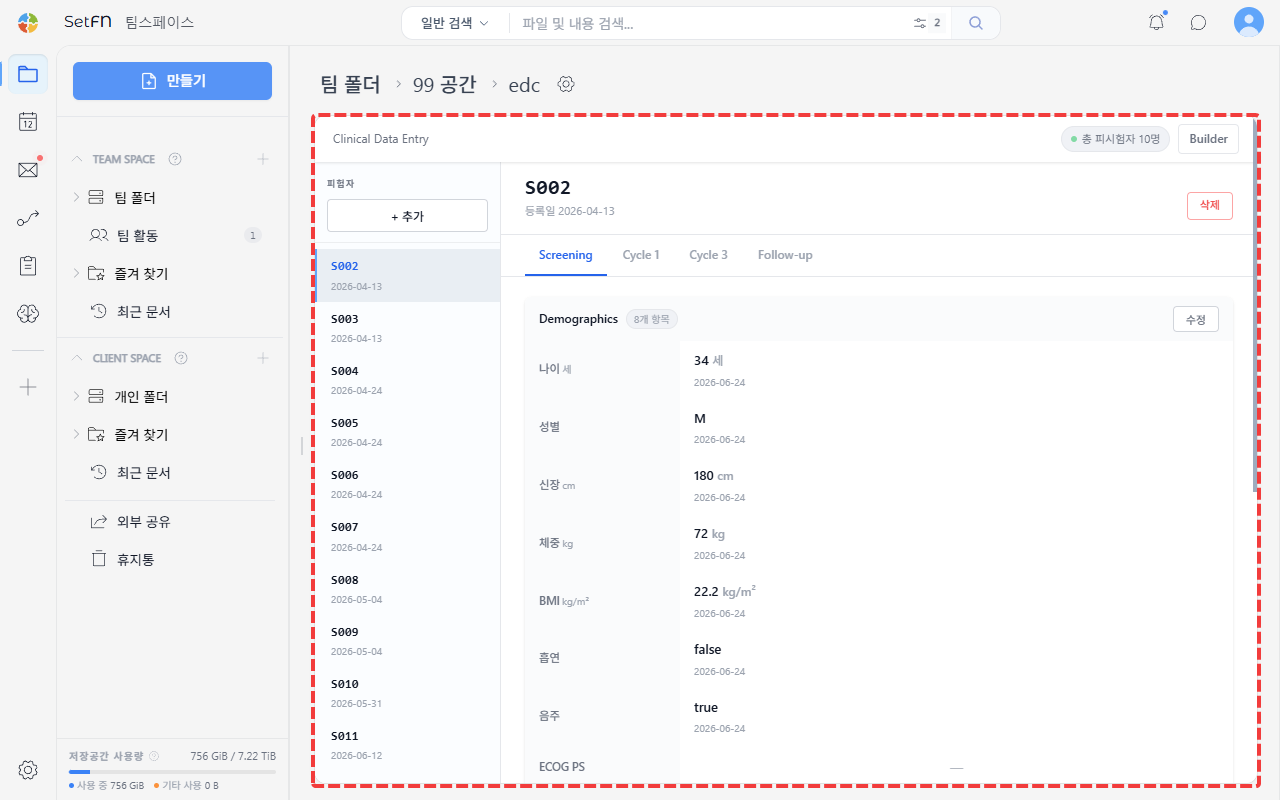
Things you can build
- In-house ERP: Screens for managing business data such as purchase orders, inventory, and accounting
- Bulletin boards: Internal posting spaces for the team, such as announcements or a free discussion board
- Inventory management: Managing stock quantities for a warehouse or store
Access permissions are the same as your workspace account
There's no need to build a separate login screen. The people who can access the web service you've built are already logged-in workspace members, so the member, level, and team conditions set in the API permission settings apply as-is. For details, see Build APIs and deploy a database.