'/%3e%3cpath%20id='cross_2'%20data-name='cross%202'%20class='cls-2'%20d='M20.612,30.43h0a5.361,5.361,0,1,0-10.723,0H0A33.709,33.709,0,0,1,30.569,0V9.75a5.361,5.361,0,1,1,0,10.723V30.43Z'%20transform='translate(67.193%200.007)%20rotate(90)'/%3e%3cpath%20id='cross_3'%20data-name='cross%203'%20class='cls-3'%20d='M20.612,30.43h0a5.361,5.361,0,1,0-10.723,0H0A33.709,33.709,0,0,1,30.569,0V9.75a5.361,5.361,0,1,1,0,10.723V30.43Z'%20transform='translate(67.186%2067.041)%20rotate(180)'/%3e%3cpath%20id='cross_4'%20data-name='cross%204'%20class='cls-4'%20d='M20.6,30.5h0a5.361,5.361,0,1,0-10.723,0H0A33.71,33.71,0,0,1,30.56,0V9.818a5.361,5.361,0,1,1,0,10.723V30.5Z'%20transform='translate(0%2067.041)%20rotate(-90)'/%3e%3c/svg%3e)
Putting an NVIDIA DGX Spark to Work with File Management and Knowledge Indexing
The DGX Spark is a device built to run demanding AI workloads locally. Once you've installed a local AI runtime like Ollama on it, the next question is what to actually run on top of it. Installing SetFN on a DGX Spark gives you a space where your team's files live, and at the same time a knowledge base you can search with local AI.
Consider This If
- You bought a DGX Spark and installed a local AI runtime like Ollama, but aren't sure what to do next
- You want to search and use internal documents or research data without sending them to a cloud AI service
- You want to bring files scattered across different locations into one place and immediately be able to search them with AI
Suggested Setup
Start by turning the DGX Spark into a place where files collect, then make those files something AI can understand.
- Install SetFN SpaceBuilder on the DGX Spark to create a workspace.
- Start with basic file management by collecting documents, code, and research materials into team and personal folders.
- In the admin settings, set the AI runtime to the Ollama you already installed, and choose an embedding model and a vision model.
- Turn on knowledge indexing so the documents in your folders become searchable.
Applying This to Your Workflow
- Install SetFN SpaceBuilder on the DGX Spark and create a workspace.
- Move documents and materials that were scattered across different locations into team or personal folders, organizing files the way you would in a familiar file explorer.
- In the admin settings, set the AI runtime to Ollama, and choose the embedding model and vision model to use for indexing.
- Turn on knowledge indexing and specify which folders to index. You can check progress — pending updates, embedding counts, and more — directly on the screen.
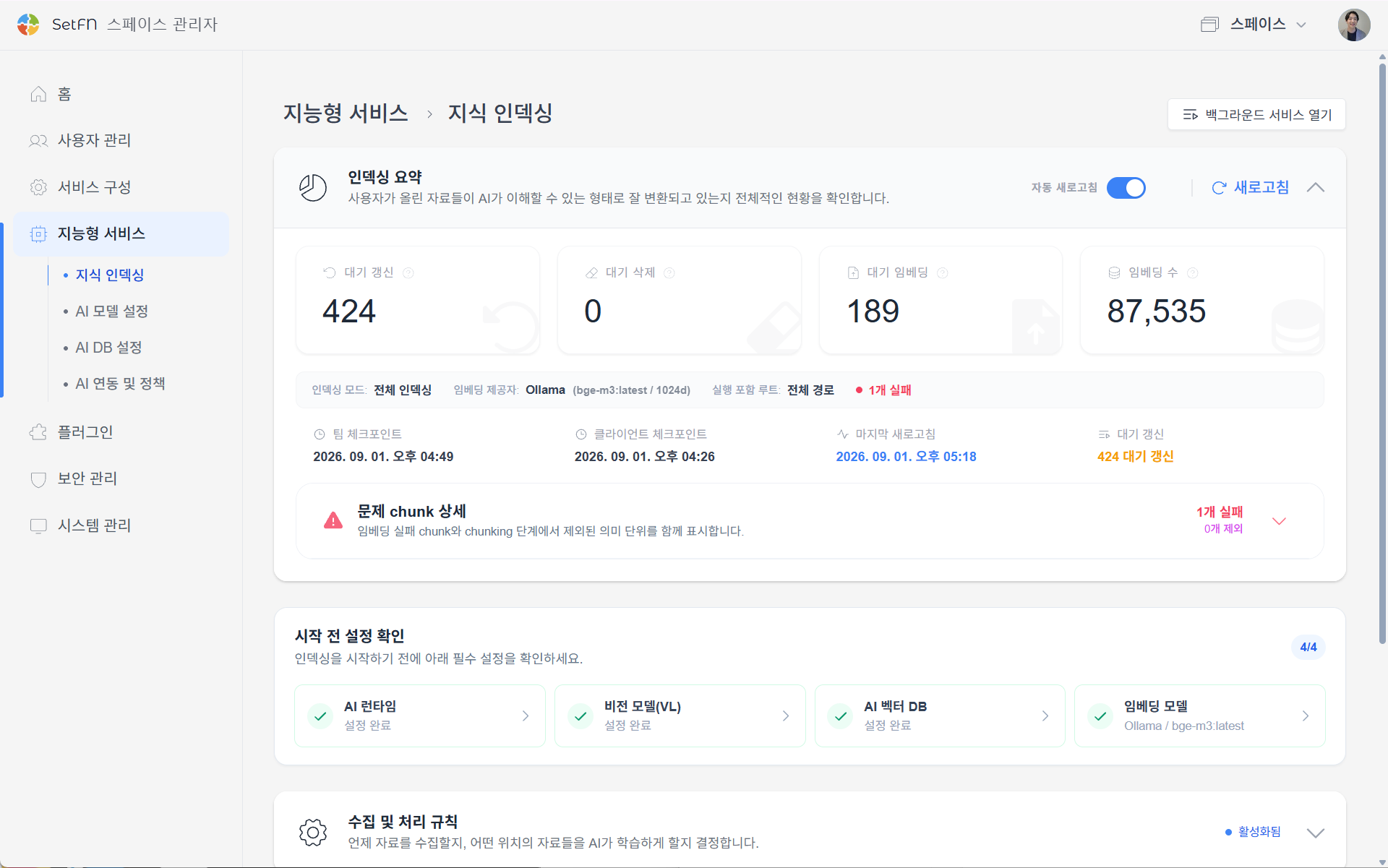
- Once indexing finishes, try Context Search (AI) to search the documents in your folders. It can find documents with similar meaning even if you don't remember the exact keywords.
Features Worth Using Together
- Context Search (AI): Finds relevant documents by meaning, even without an exact keyword match.
- Image Search: Uses AI to find text inside images or visually similar images.
- File Tags: Tag frequently referenced documents to classify them and put them to use as part of the AI knowledge base.
Things to Check Before You Start
- Before turning on knowledge indexing, confirm your AI runtime (Ollama), vision model, embedding model, and AI vector DB settings. Selecting a model doesn't install it — download each one in Ollama beforehand.
- If you don't specify which folders to index (included roots), the entire path becomes the target. If you only need to index a specific scope, set the paths first.
- The DGX Spark's GPU resources may be shared between indexing and other AI workloads, so adjust settings like the maximum concurrent jobs or auto-pause under high load to fit your situation.