'/%3e%3cpath%20id='cross_2'%20data-name='cross%202'%20class='cls-2'%20d='M20.612,30.43h0a5.361,5.361,0,1,0-10.723,0H0A33.709,33.709,0,0,1,30.569,0V9.75a5.361,5.361,0,1,1,0,10.723V30.43Z'%20transform='translate(67.193%200.007)%20rotate(90)'/%3e%3cpath%20id='cross_3'%20data-name='cross%203'%20class='cls-3'%20d='M20.612,30.43h0a5.361,5.361,0,1,0-10.723,0H0A33.709,33.709,0,0,1,30.569,0V9.75a5.361,5.361,0,1,1,0,10.723V30.43Z'%20transform='translate(67.186%2067.041)%20rotate(180)'/%3e%3cpath%20id='cross_4'%20data-name='cross%204'%20class='cls-4'%20d='M20.6,30.5h0a5.361,5.361,0,1,0-10.723,0H0A33.71,33.71,0,0,1,30.56,0V9.818a5.361,5.361,0,1,1,0,10.723V30.5Z'%20transform='translate(0%2067.041)%20rotate(-90)'/%3e%3c/svg%3e)
Export
Monitor training results by run for each stage such as PT and SFT, and easily carry successful weights over as the Base Model for the next fine-tuning round.
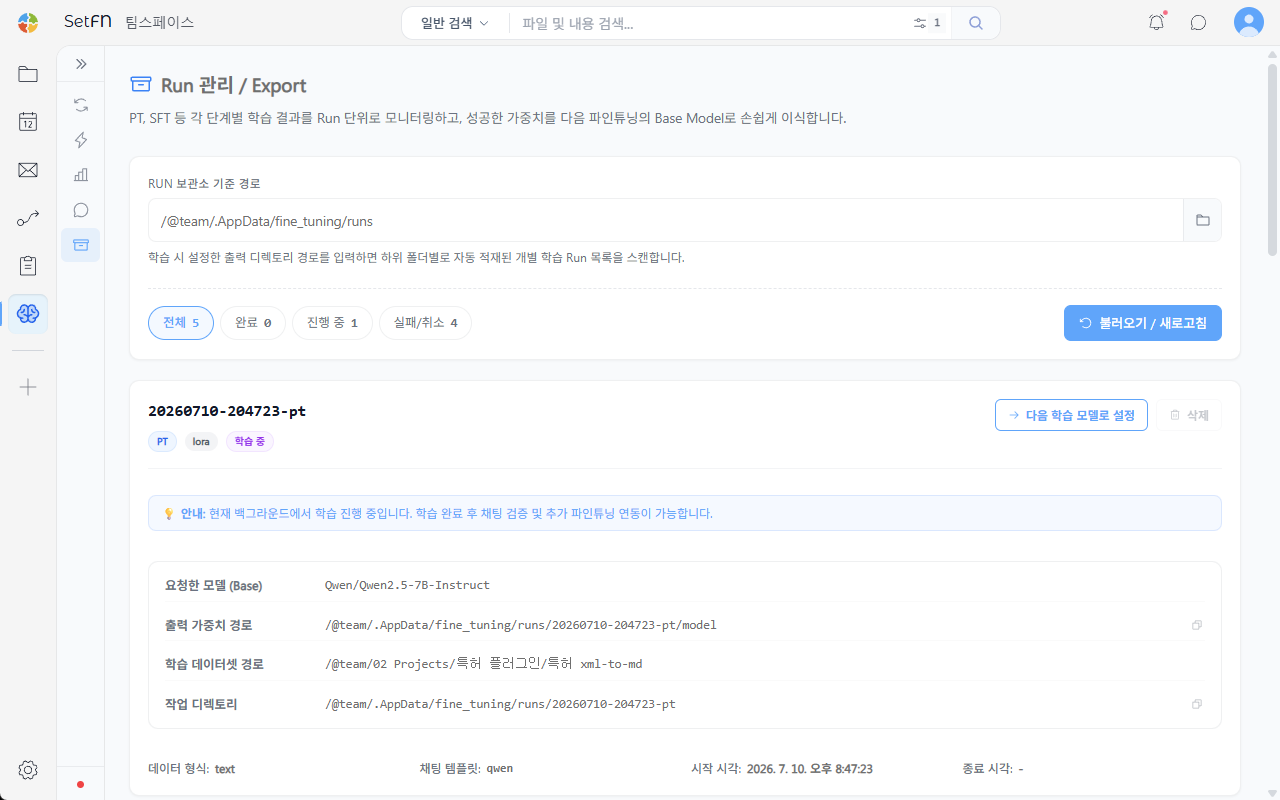
Setting the RUN Archive Path
Enter the output directory path set during training to scan the individual training runs automatically stored in each subfolder. The default path is /@team/.AppData/fine_tuning/runs.
Filtering by Run Status
You can filter the run list by All, Completed, In Progress, or Failed/Cancelled status. Use the Load / Refresh button to reflect the latest status.
Viewing Run Details
Each run card shows the following information.
| Item | Description |
|---|---|
| Requested model (Base) | The base model used for training |
| Output weights path | The path where the resulting training weights are saved |
| Training dataset path | The path of the dataset used for training |
| Working directory | The working folder for that run |
| Data format / Chat template | The data format and chat template used for training |
| Start time / End time | The run's start and end times |
Setting as the Next Training Model
Click the Set as Next Training Model button to carry that run's resulting weights over directly as the Base Model for the next fine-tuning round. Clean up unnecessary runs with the Delete button.
Good to Know
- For a run still training in the background, chat testing and connecting it to further fine-tuning are only available once training finishes.