'/%3e%3cpath%20id='cross_2'%20data-name='cross%202'%20class='cls-2'%20d='M20.612,30.43h0a5.361,5.361,0,1,0-10.723,0H0A33.709,33.709,0,0,1,30.569,0V9.75a5.361,5.361,0,1,1,0,10.723V30.43Z'%20transform='translate(67.193%200.007)%20rotate(90)'/%3e%3cpath%20id='cross_3'%20data-name='cross%203'%20class='cls-3'%20d='M20.612,30.43h0a5.361,5.361,0,1,0-10.723,0H0A33.709,33.709,0,0,1,30.569,0V9.75a5.361,5.361,0,1,1,0,10.723V30.43Z'%20transform='translate(67.186%2067.041)%20rotate(180)'/%3e%3cpath%20id='cross_4'%20data-name='cross%204'%20class='cls-4'%20d='M20.6,30.5h0a5.361,5.361,0,1,0-10.723,0H0A33.71,33.71,0,0,1,30.56,0V9.818a5.361,5.361,0,1,1,0,10.723V30.5Z'%20transform='translate(0%2067.041)%20rotate(-90)'/%3e%3c/svg%3e)
Evaluation
Review the results of completed fine-tuning training runs, re-validate dataset validity, and connect directly to the next training stage or a chat test.
Checking Run Status
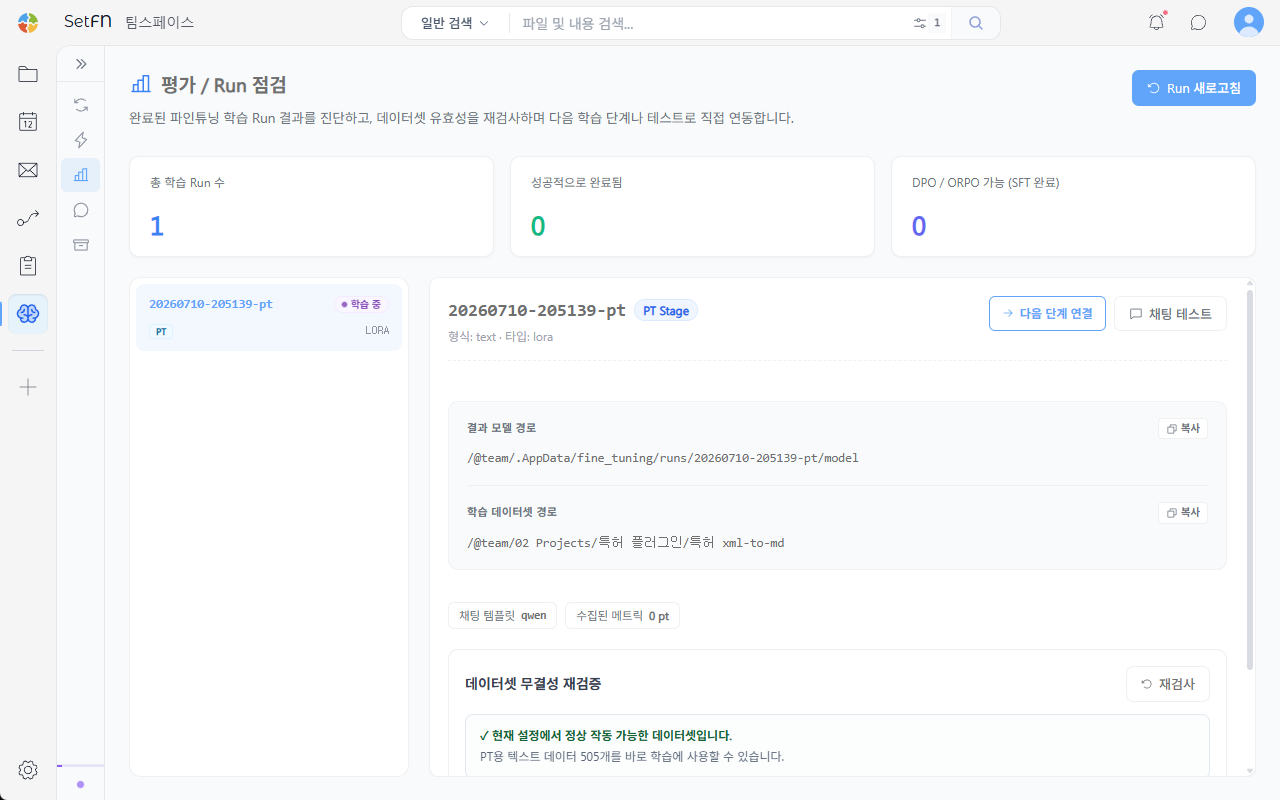
At the top of the screen, you can check the total number of training runs, the number that completed successfully, and the number of runs (SFT-completed) that can proceed to DPO/ORPO. Use the Refresh Runs button to load the latest status.
Run List and Details
Selecting a run from the list on the left shows its details on the right.
- STAGE (PT/SFT/DPO/ORPO) and fine-tuning approach (e.g., lora)
- Result model path, training dataset path (with a copy button)
- Chat template, number of collected metrics
Re-validating Dataset Integrity
Click the Re-check button to re-verify whether the dataset can work correctly with the current settings.
Connecting to the Next Stage
Connect to Next Stage: Connects this run's resulting model directly as the Base Model for the next training round (for example, DPO after SFT completes).Chat Test: Takes you to a screen where you can chat directly with this run's resulting model.