'/%3e%3cpath%20id='cross_2'%20data-name='cross%202'%20class='cls-2'%20d='M20.612,30.43h0a5.361,5.361,0,1,0-10.723,0H0A33.709,33.709,0,0,1,30.569,0V9.75a5.361,5.361,0,1,1,0,10.723V30.43Z'%20transform='translate(67.193%200.007)%20rotate(90)'/%3e%3cpath%20id='cross_3'%20data-name='cross%203'%20class='cls-3'%20d='M20.612,30.43h0a5.361,5.361,0,1,0-10.723,0H0A33.709,33.709,0,0,1,30.569,0V9.75a5.361,5.361,0,1,1,0,10.723V30.43Z'%20transform='translate(67.186%2067.041)%20rotate(180)'/%3e%3cpath%20id='cross_4'%20data-name='cross%204'%20class='cls-4'%20d='M20.6,30.5h0a5.361,5.361,0,1,0-10.723,0H0A33.71,33.71,0,0,1,30.56,0V9.818a5.361,5.361,0,1,1,0,10.723V30.5Z'%20transform='translate(0%2067.041)%20rotate(-90)'/%3e%3c/svg%3e)
Chat Test
Load or connect a trained model and check the fine-tuning results by chatting with it directly.
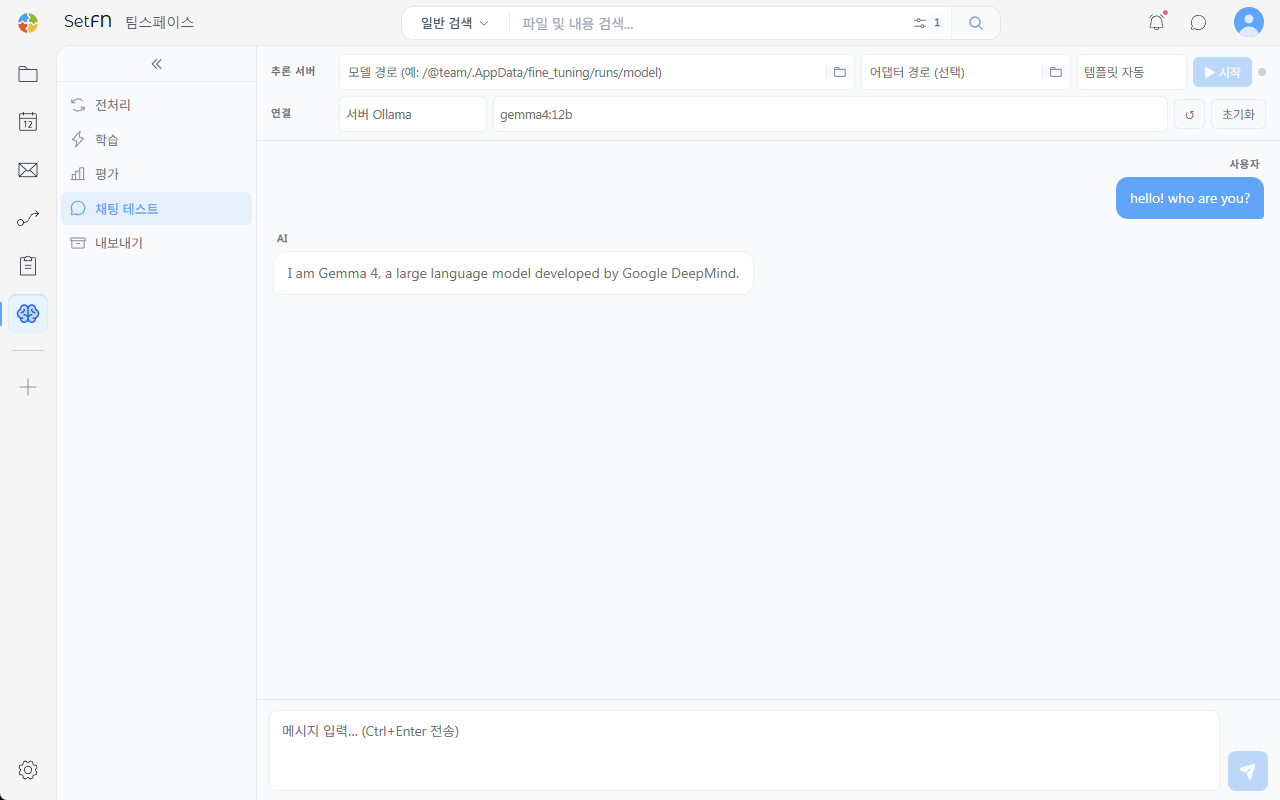
Loading a Model into the Inference Server
Load a trained model directly to test it.
- Model path: Enter the path of the model to test (e.g.,
/@team/.AppData/fine_tuning/runs/model) - Adapter path (optional): If you're using only the adapter weights trained separately, such as via LoRA, specify the path here
- Template: Automatically detected by default
After entering the path, click the Start button to launch the inference server.
Connecting to an Ollama Server
You can also test directly with a model already registered in Ollama. In the Connect area, enter the server (Ollama) and model name (e.g., gemma4:12b), then check the connection status with the refresh button. Click the Reset button to start the setup over.
Checking Results Through Conversation
Enter a message in the input box at the bottom and send it with Ctrl+Enter (or the send button); the user message and the AI's response are displayed as a chat. Ask questions relevant to your training goal to check the quality and format of the responses.
Good to Know
- A model that has only completed PT (pre-training) may produce continuation-style responses rather than instruction-following conversation. To check instruction-following quality, test with a model that has also completed SFT.
- If you specify only the adapter path and leave the model path blank, it may not load correctly.