'/%3e%3cpath%20id='cross_2'%20data-name='cross%202'%20class='cls-2'%20d='M20.612,30.43h0a5.361,5.361,0,1,0-10.723,0H0A33.709,33.709,0,0,1,30.569,0V9.75a5.361,5.361,0,1,1,0,10.723V30.43Z'%20transform='translate(67.193%200.007)%20rotate(90)'/%3e%3cpath%20id='cross_3'%20data-name='cross%203'%20class='cls-3'%20d='M20.612,30.43h0a5.361,5.361,0,1,0-10.723,0H0A33.709,33.709,0,0,1,30.569,0V9.75a5.361,5.361,0,1,1,0,10.723V30.43Z'%20transform='translate(67.186%2067.041)%20rotate(180)'/%3e%3cpath%20id='cross_4'%20data-name='cross%204'%20class='cls-4'%20d='M20.6,30.5h0a5.361,5.361,0,1,0-10.723,0H0A33.71,33.71,0,0,1,30.56,0V9.818a5.361,5.361,0,1,1,0,10.723V30.5Z'%20transform='translate(0%2067.041)%20rotate(-90)'/%3e%3c/svg%3e)
Preprocessing Training Data
Convert and clean raw data (XML, HTML, JSON, TXT) to fit the training purpose (PT/SFT), and connect it directly to the Training tab.
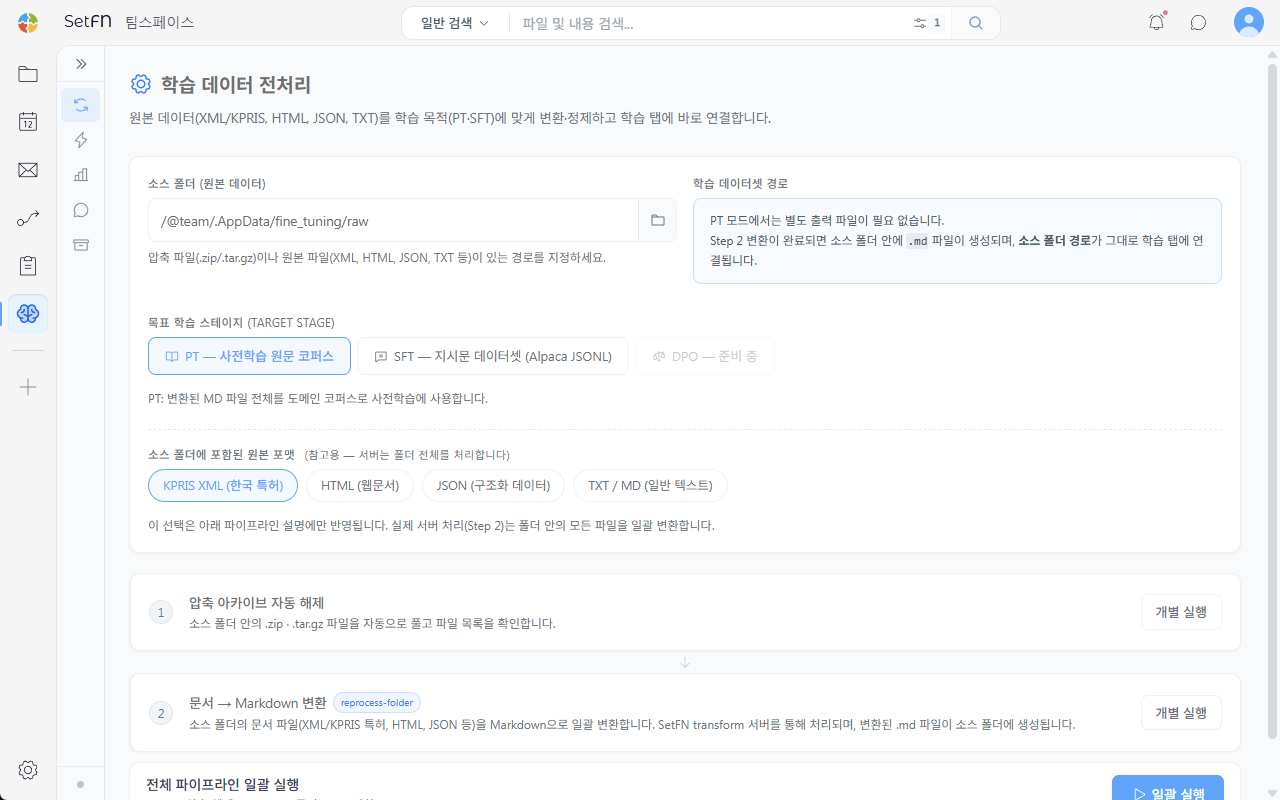
Specifying the Source Folder
Specify the path of the source folder containing archive files (.zip/.tar.gz) or raw files (XML, HTML, JSON, TXT, etc.). The default path is /@team/.AppData/fine_tuning/raw.
Selecting the Target Training Stage
Select the purpose for which the data will be converted.
| Stage | Description |
|---|---|
| PT — Pre-training raw corpus | Uses the entire set of converted MD files as a domain corpus for pre-training |
| SFT — Instruction dataset (Alpaca JSONL) | Converts data into an instruction dataset in instruction/input/output format |
| DPO | Not currently available |
In PT mode, no separate output file is required. Once conversion is complete, .md files are created inside the source folder, and the source folder path is connected directly to the Training tab.
Raw Formats Contained in the Source Folder
For reference, this shows which formats of raw files are mixed in the source folder. You can choose among KIPRIS XML (Korean patents), HTML (web documents), JSON (structured data), and TXT/MD (plain text); this selection only affects the pipeline description below. The actual server-side processing batch-converts every file in the folder.
Running the Pipeline
The pipeline consists of two stages, which can be run individually or all at once in a batch.
- Automatic archive extraction: Automatically unpacks .zip/.tar.gz files in the source folder and lists the files.
- Document → Markdown conversion: Batch-converts document files (XML, HTML, JSON, etc.) in the source folder to Markdown. The converted .md files are created in the source folder.
Clicking the Run Full Pipeline in Batch button runs both stages in sequence.