'/%3e%3cpath%20id='cross_2'%20data-name='cross%202'%20class='cls-2'%20d='M20.612,30.43h0a5.361,5.361,0,1,0-10.723,0H0A33.709,33.709,0,0,1,30.569,0V9.75a5.361,5.361,0,1,1,0,10.723V30.43Z'%20transform='translate(67.193%200.007)%20rotate(90)'/%3e%3cpath%20id='cross_3'%20data-name='cross%203'%20class='cls-3'%20d='M20.612,30.43h0a5.361,5.361,0,1,0-10.723,0H0A33.709,33.709,0,0,1,30.569,0V9.75a5.361,5.361,0,1,1,0,10.723V30.43Z'%20transform='translate(67.186%2067.041)%20rotate(180)'/%3e%3cpath%20id='cross_4'%20data-name='cross%204'%20class='cls-4'%20d='M20.6,30.5h0a5.361,5.361,0,1,0-10.723,0H0A33.71,33.71,0,0,1,30.56,0V9.818a5.361,5.361,0,1,1,0,10.723V30.5Z'%20transform='translate(0%2067.041)%20rotate(-90)'/%3e%3c/svg%3e)
Context Search (AI Search)
Even without an exact keyword match, this finds related files by understanding meaning.
Before Using This
Knowledge indexing must be enabled in the administrator settings. Only files that have finished indexing are searchable through context search.
Context search stores each file's meaning as vectors, so an embedding model must be available locally to perform this conversion.
Both indexing and search are processed inside the workspace, so files are not sent outside it.
- Embedding model: A model that converts text into vectors. If your workspace contains documents in multiple languages, use a model with strong multilingual support. (e.g.,
bge-m3) - To see document sources with the answer, indexing must be completed using this embedding model.
→ Preparing an embedding model and indexing documents: Knowledge Indexing Settings
How to Search
- Select
Context Searchfrom the menu on the left side of the search bar. - To use AI search assistance, click the
🪄button on the right side of the search bar.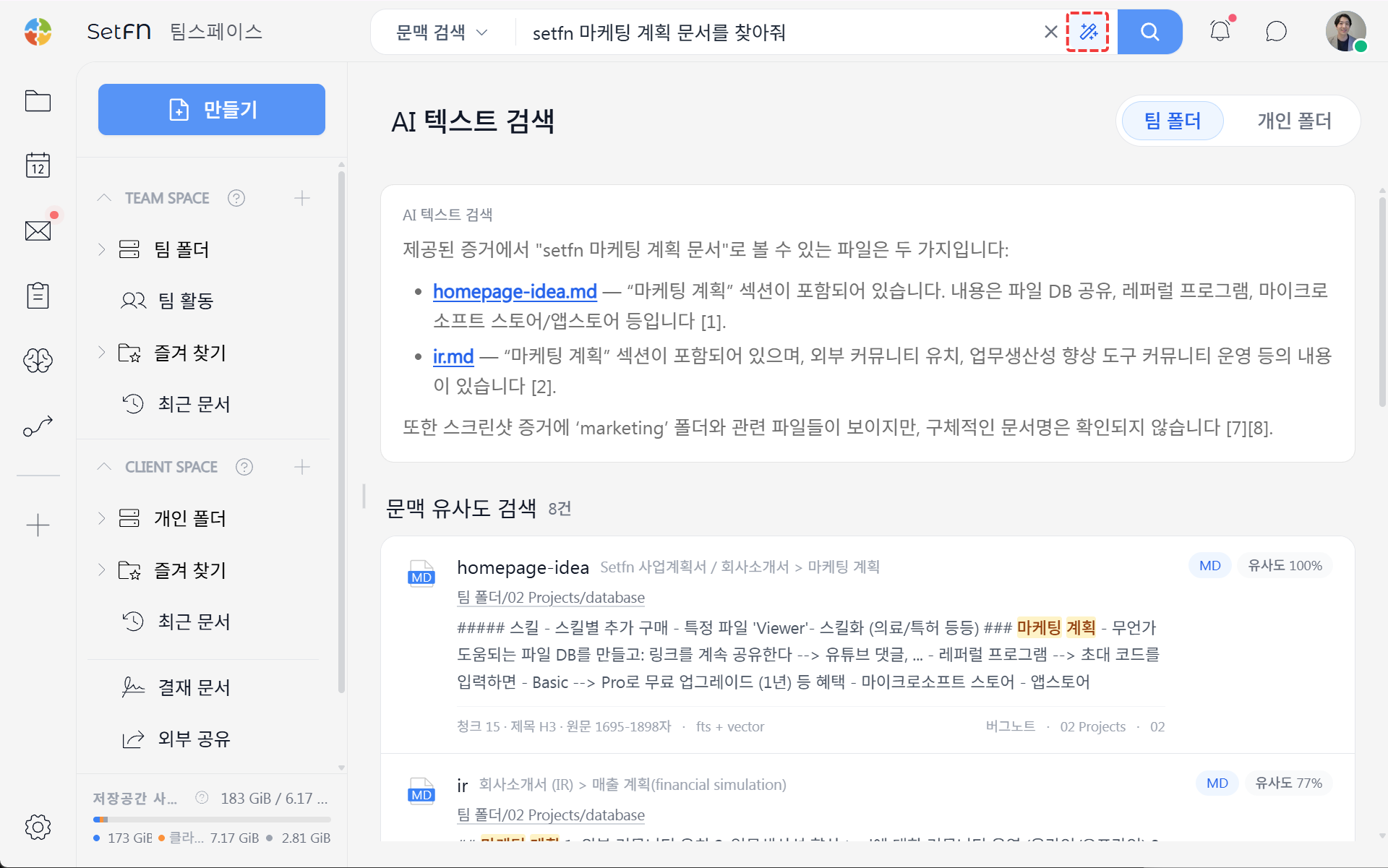
AI Search Results
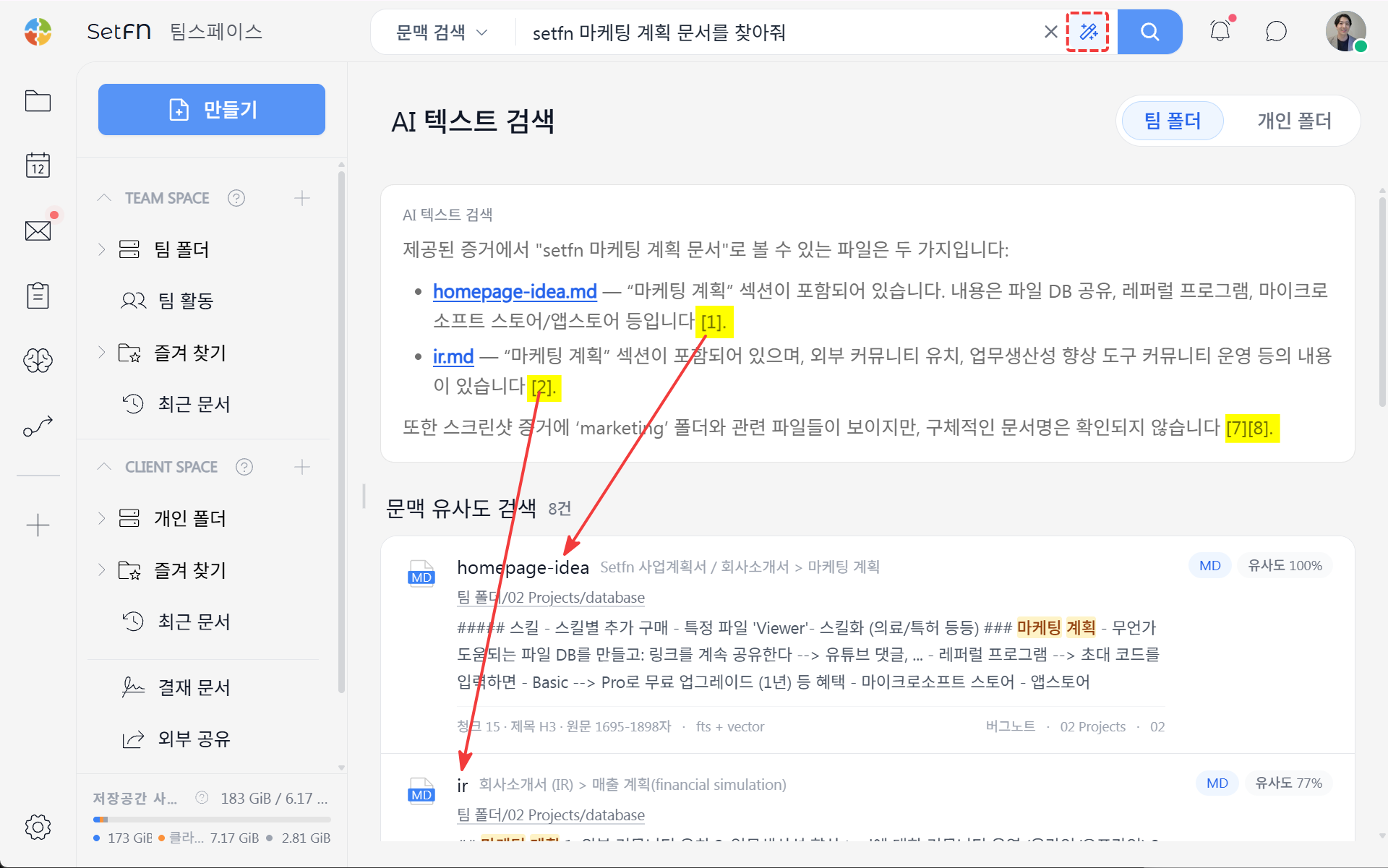
AI summarizes the search results and shows the internal documents used as sources.
The numbered document sources correspond to the order of the context-similarity results. A document shown as a source is evidence the AI used when preparing its answer.
Answers Grounded in Your Actual Documents (RAG)
Context search does not rely only on the AI's general knowledge. It first finds actual workspace documents related to the question, then supplies their contents as source material so the answer can include supporting references. This approach is called retrieval-augmented generation (RAG).
Using actual documents in an answer involves two stages: indexing and search.
Indexing (preparation)
- Each file is divided into meaningful units called chunks.
- An embedding model such as
bge-m3converts each chunk into a vector. - The generated vectors are stored in the workspace's vector store.
Search (when a question is asked)
- The question is converted into a vector using the same embedding model.
- The system finds the closest chunks in similarity order.
- The retrieved chunks are provided to the AI as source material.
- The AI summarizes an answer based on that material and displays the documents containing the cited chunks.
This structure finds internal documents with similar meaning even when the exact keyword is not used. Because the answer includes the documents it actually referenced, you can open them and verify the supporting evidence directly.
Questions and documents must be converted into vectors by the same embedding model to be comparable. If you change the embedding model used for indexing, you must re-index all files.
Difference from General Search
| General search | Context search | |
|---|---|---|
| Method | Keyword text matching | AI embedding-based semantic search |
| Search terms | Exact words required | Natural language, similar phrasing allowed |
| Target | File names/file content | Knowledge-indexed files |
| Requirements | None | Local embedding model and knowledge indexing |
Good to Know
- Right after indexing, search results may be incomplete. Search after indexing has finished.
- Search results may vary depending on how a question is phrased. Try asking in different ways.
- Search quality depends on the embedding model's performance and language support.
- Changing the embedding model makes the existing index incompatible, so all documents must be re-indexed.