'/%3e%3cpath%20id='cross_2'%20data-name='cross%202'%20class='cls-2'%20d='M20.612,30.43h0a5.361,5.361,0,1,0-10.723,0H0A33.709,33.709,0,0,1,30.569,0V9.75a5.361,5.361,0,1,1,0,10.723V30.43Z'%20transform='translate(67.193%200.007)%20rotate(90)'/%3e%3cpath%20id='cross_3'%20data-name='cross%203'%20class='cls-3'%20d='M20.612,30.43h0a5.361,5.361,0,1,0-10.723,0H0A33.709,33.709,0,0,1,30.569,0V9.75a5.361,5.361,0,1,1,0,10.723V30.43Z'%20transform='translate(67.186%2067.041)%20rotate(180)'/%3e%3cpath%20id='cross_4'%20data-name='cross%204'%20class='cls-4'%20d='M20.6,30.5h0a5.361,5.361,0,1,0-10.723,0H0A33.71,33.71,0,0,1,30.56,0V9.818a5.361,5.361,0,1,1,0,10.723V30.5Z'%20transform='translate(0%2067.041)%20rotate(-90)'/%3e%3c/svg%3e)
Checking Your Access Address (Local/Internal Network)
SetFN SpaceBuilder can be accessed immediately using two types of addresses, without any extra configuration: a local address for accessing from the very computer it's installed on, and an internal network address for accessing from other devices on the same office network (same Wi-Fi/router).
Accessing from outside the office, from a different network, or over mobile data is not covered here. It requires a separate domain connection, which is covered separately in Configuring an Access Domain.
Before you begin
- Permission required: Administrator or regular user
- Prerequisite: SetFN SpaceBuilder must be running
Checking your access address
Check the address currently available in the access address area at the bottom left of SpaceBuilder.
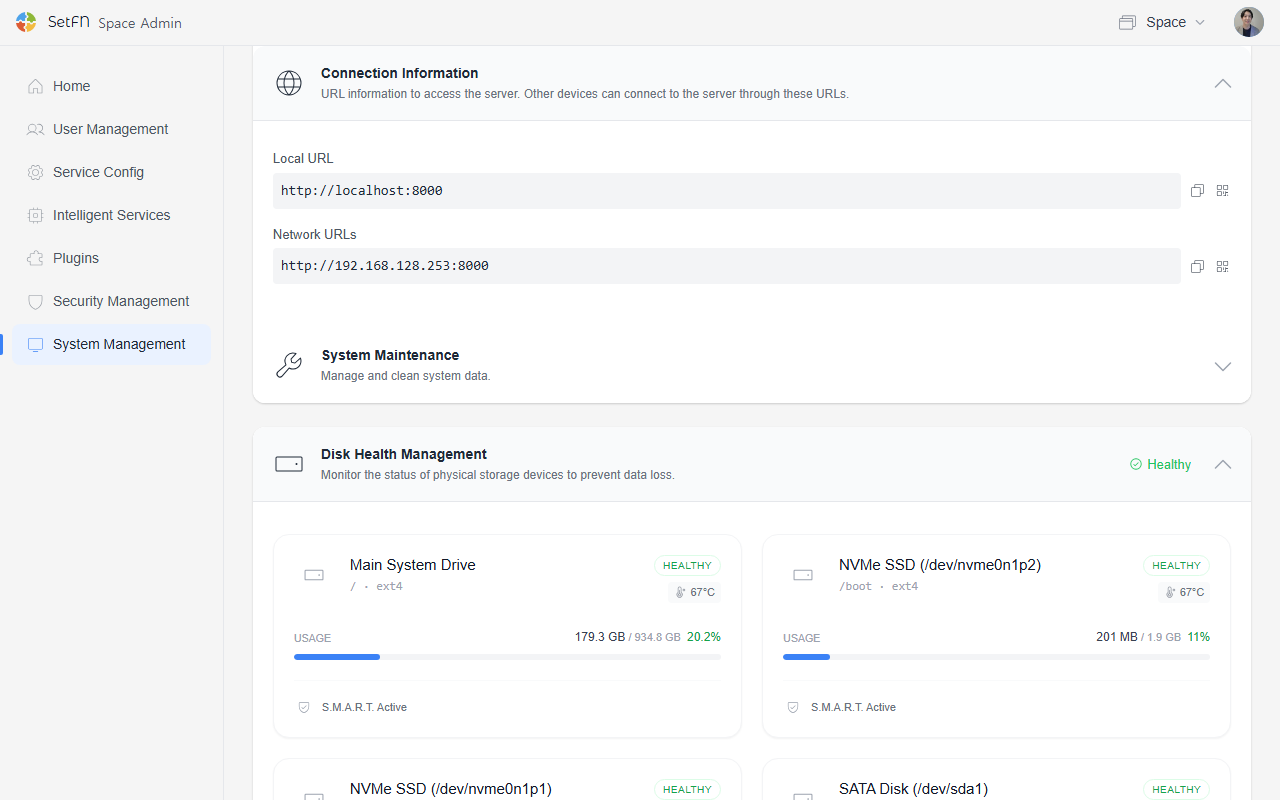
| Address type | Example | When to use it |
|---|---|---|
| Local access address | http://localhost:8510 | When accessing from the very computer SpaceBuilder is installed on |
| Internal network access address | http://192.168.xx.xx:8510 | When accessing from another device on the same office network (same Wi-Fi/router) |
An easy way to tell them apart
- If you're on the same Wi-Fi (same router), it's an internal network. This applies whether it's an office Wi-Fi or a home Wi-Fi.
- Use the
localhostaddress only when working directly on the computer SpaceBuilder is installed on. - For anything else (a different Wi-Fi, mobile data, an external network), neither of these addresses will work — you'll need a separate domain connection.
Using the local access address
The localhost address can only be used from within the computer SpaceBuilder is installed on.
http://localhost:8510
This address is the first one to use right after installation, whether you're doing the initial setup or checking that the server is running correctly.
Keep in mind that localhost always refers to "your own computer." Entering localhost:8510 on someone else's computer will not connect you to the computer where SpaceBuilder is installed.
Using the internal network access address
An address beginning with 192.168... or 10... is used when accessing from within the same office network (same Wi-Fi/router).
http://192.168.xx.xx:8510
This address is suitable for the following situations.
| Situation | Description |
|---|---|
| Office | Team members on the same router connecting together |
| Home | Family members or personal devices on the same Wi-Fi connecting |
| Lab/shared office | Members connected to the same router checking materials |
The internal network address only works within the same network. It won't connect from a different Wi-Fi, mobile data, or an external office.
Sharing the address
Using the copy button or QR code next to the access address, you can instantly share the internal network address with teammates on the same office network.
Sharing the internal network address with someone on a different network will not let them connect. If you need to share with someone outside your organization, first complete Configuring an Access Domain.
Things to know
- Sharing the
localhostaddress with someone else will not let them connect. - Addresses like
192.168.x.xor10.x.x.xare internal network addresses and cannot be reached from the public internet. - If your network environment changes (for example, moving to a different office), the internal network address may change as well.
- If you also need access from outside the office, from external partners, or from mobile data, see Configuring an Access Domain.