'/%3e%3cpath%20id='cross_2'%20data-name='cross%202'%20class='cls-2'%20d='M20.612,30.43h0a5.361,5.361,0,1,0-10.723,0H0A33.709,33.709,0,0,1,30.569,0V9.75a5.361,5.361,0,1,1,0,10.723V30.43Z'%20transform='translate(67.193%200.007)%20rotate(90)'/%3e%3cpath%20id='cross_3'%20data-name='cross%203'%20class='cls-3'%20d='M20.612,30.43h0a5.361,5.361,0,1,0-10.723,0H0A33.709,33.709,0,0,1,30.569,0V9.75a5.361,5.361,0,1,1,0,10.723V30.43Z'%20transform='translate(67.186%2067.041)%20rotate(180)'/%3e%3cpath%20id='cross_4'%20data-name='cross%204'%20class='cls-4'%20d='M20.6,30.5h0a5.361,5.361,0,1,0-10.723,0H0A33.71,33.71,0,0,1,30.56,0V9.818a5.361,5.361,0,1,1,0,10.723V30.5Z'%20transform='translate(0%2067.041)%20rotate(-90)'/%3e%3c/svg%3e)
Extension Plugin Settings
Admins can use the Plugin screen to check the status of installed extension plugins and change their enabled status with a toggle switch.
Opening Extension Plugins
- Access the admin page.
- Select
Pluginfrom the left menu. - Select
Extension Pluginsfrom the submenu. - View the list of installed plugins.
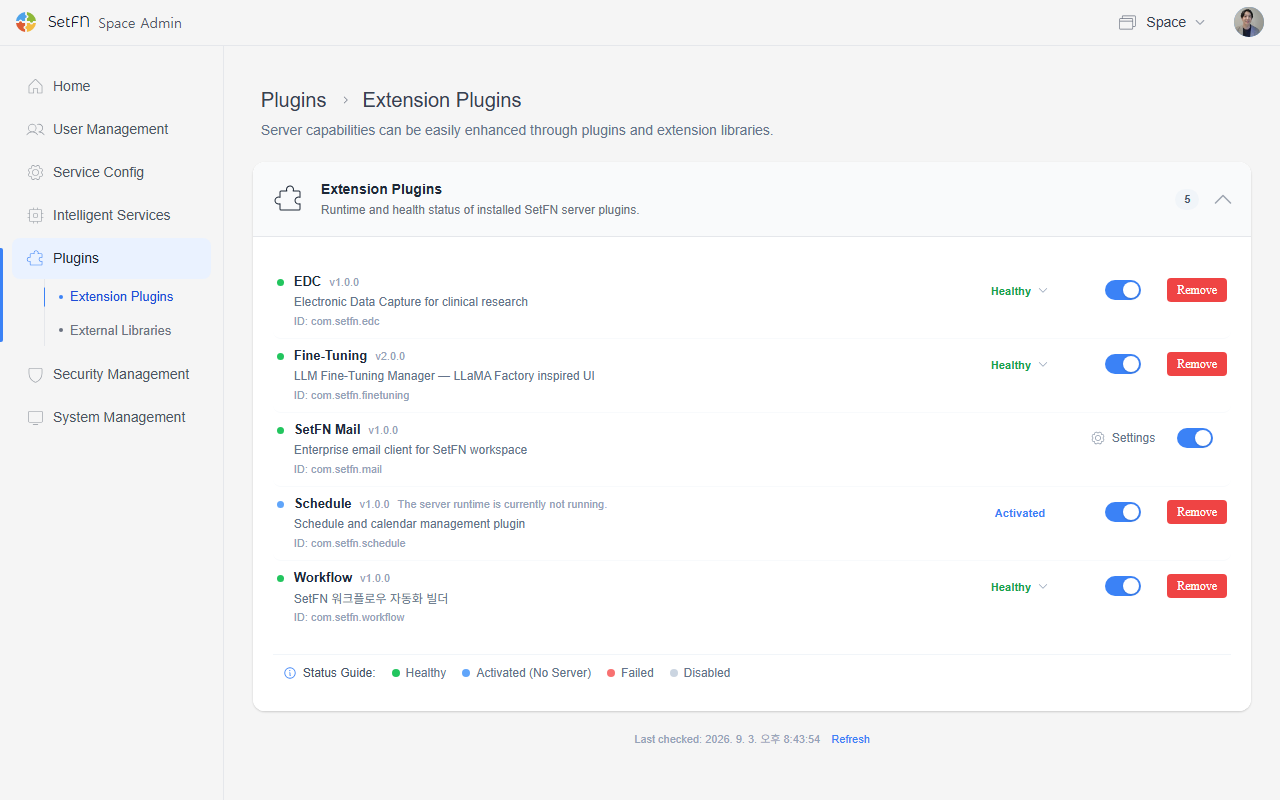
Checking Plugin Status
Each plugin row shows the name, version, description, plugin ID, and status.
| Item | Description |
|---|---|
| Plugin name | The name of the installed plugin, such as Workflow, SetFN Mail, or EDC. |
| Version | The version of the installed plugin. |
| ID | The plugin identifier, such as com.setfn.workflow. |
| Status | The running status of the plugin. |
| Toggle switch | Enables or disables the plugin. |
| Settings icon | Shown for plugins that have separate settings. |
| Remove | Deletes the plugin. |
Status may display as Normal, Enabled, Failed to Run, or Disabled.
Enabling or Disabling a Plugin
- Find the plugin you want to change.
- Click the toggle switch on the right.
- When the toggle is on, the plugin is enabled.
- When the toggle is off, the plugin is disabled.
- If needed, click
Refreshto check the status again.
Disabling a plugin may cause Workspace features that rely on it to stop working.
Checking External Libraries
- Select
Pluginfrom the left menu. - Select
External Librariesfrom the submenu. - Check the installation status of required libraries and optional feature libraries.
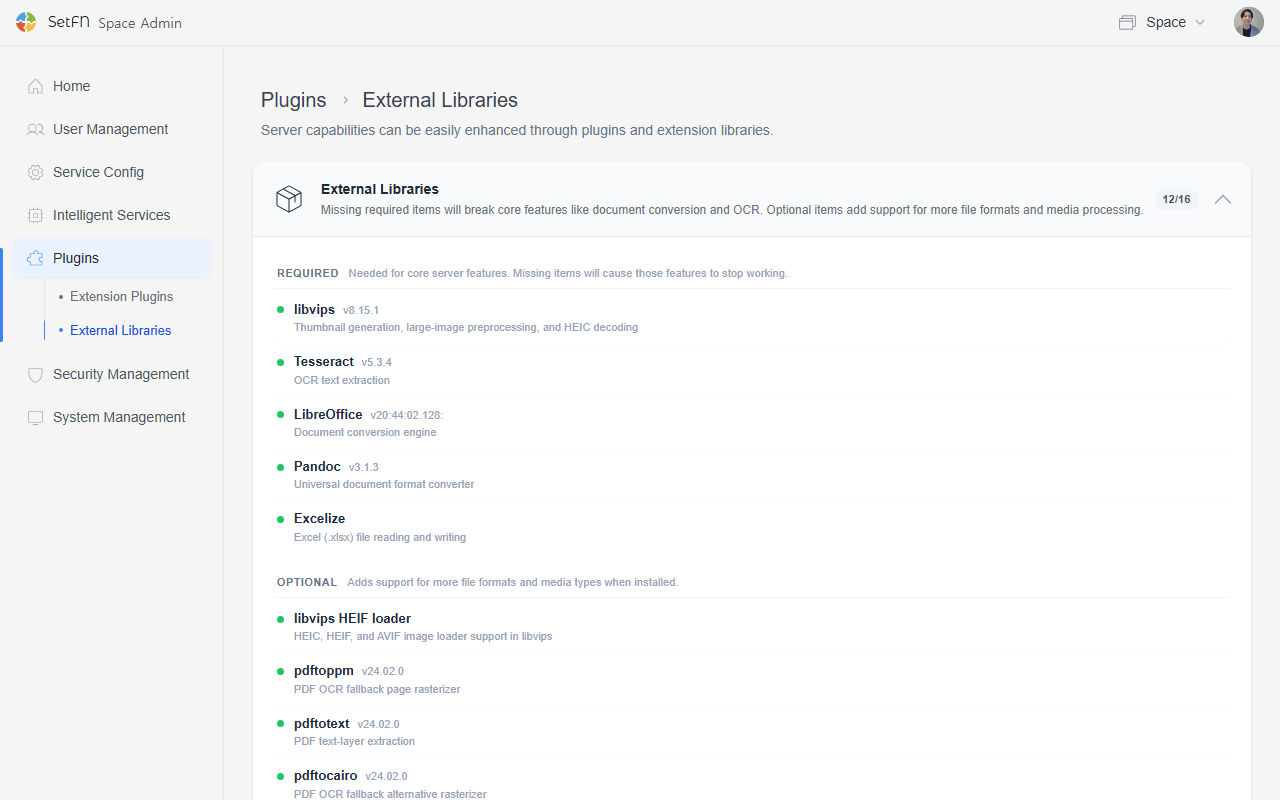
External libraries are for viewing only. You cannot enable or disable a library directly from this screen.
External Library Items
| Category | Item | Description |
|---|---|---|
| Required library | Excelize | Used to read and write Excel .xlsx files. |
| Required library | LibreOffice | The primary document conversion engine. |
| Required library | Pandoc | Used for general-purpose document format conversion. |
| Required library | Tesseract | Used for OCR text extraction. |
| Optional feature library | FFmpeg | Used for video/audio format conversion. |
| Optional feature library | FFprobe | Used for media file validation and metadata checking. |
| Optional feature library | MuTool | An alternative rasterizer used as a PDF OCR fallback. |
| Optional feature library | pdftocairo | An alternative rasterizer used as a PDF OCR fallback. |
| Optional feature library | pdftoppm | A page rasterizer used as a PDF OCR fallback. |
Good to Know
- Extension plugins are configured with a toggle switch.
- External libraries are view-only.
- Without required libraries, core features such as document conversion or OCR may not work.
- Optional feature libraries enable support for additional file formats and media processing.
- Items with an
Installation Guidebutton have a separate installation procedure you can check. - Removing a plugin can affect related features and settings, so check what's currently in use before removing it.