'/%3e%3cpath%20id='cross_2'%20data-name='cross%202'%20class='cls-2'%20d='M20.612,30.43h0a5.361,5.361,0,1,0-10.723,0H0A33.709,33.709,0,0,1,30.569,0V9.75a5.361,5.361,0,1,1,0,10.723V30.43Z'%20transform='translate(67.193%200.007)%20rotate(90)'/%3e%3cpath%20id='cross_3'%20data-name='cross%203'%20class='cls-3'%20d='M20.612,30.43h0a5.361,5.361,0,1,0-10.723,0H0A33.709,33.709,0,0,1,30.569,0V9.75a5.361,5.361,0,1,1,0,10.723V30.43Z'%20transform='translate(67.186%2067.041)%20rotate(180)'/%3e%3cpath%20id='cross_4'%20data-name='cross%204'%20class='cls-4'%20d='M20.6,30.5h0a5.361,5.361,0,1,0-10.723,0H0A33.71,33.71,0,0,1,30.56,0V9.818a5.361,5.361,0,1,1,0,10.723V30.5Z'%20transform='translate(0%2067.041)%20rotate(-90)'/%3e%3c/svg%3e)
AI DB Settings
Manage the AI search data needed for document search and RAG responses. RAG is a method in which the AI finds relevant content from stored documents to reference when answering.
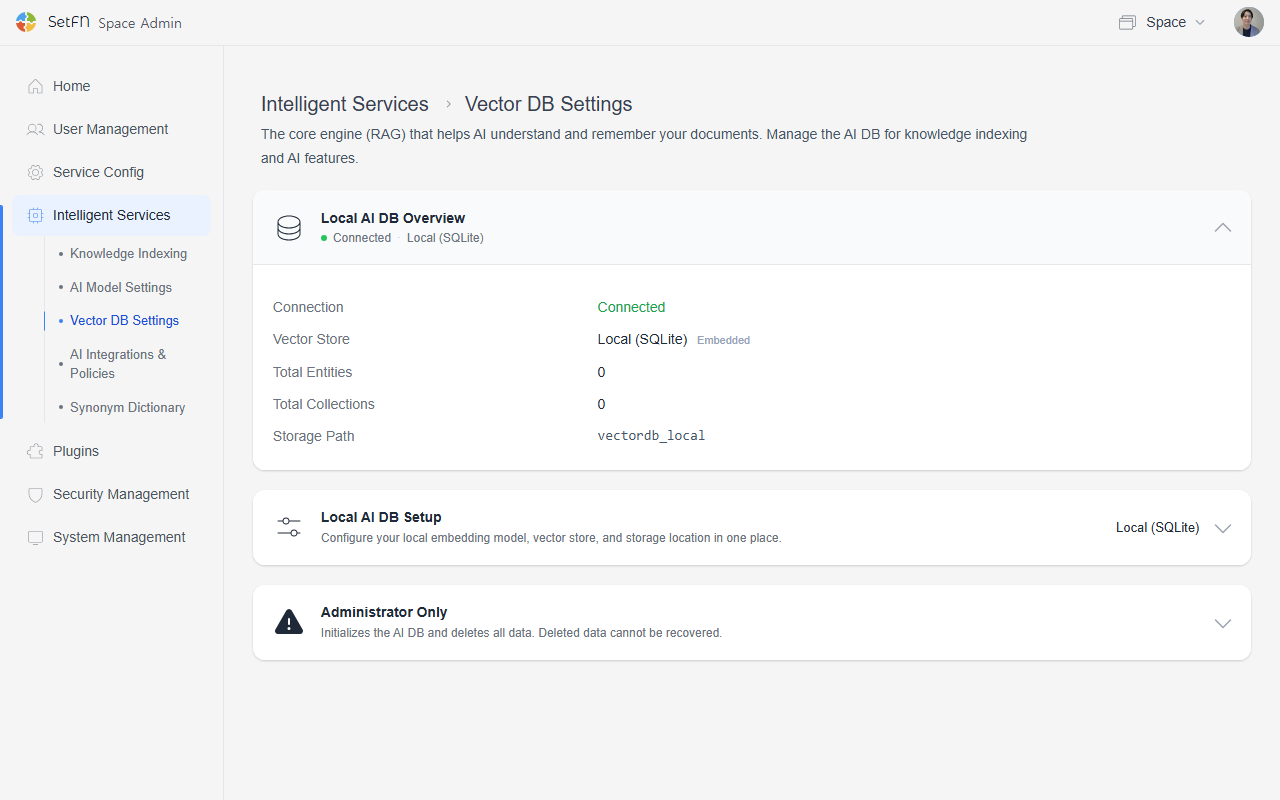
Local AI DB Operating Status
Check the status of the currently connected AI DB.
| Item | Description |
|---|---|
| Connection status | Whether the AI DB is connected |
| Vector store | The method used to store AI search data (e.g., embedded local SQLite) |
| Data (entity) count | Number of stored data items |
| Collection count | Number of created collections |
| Storage path | The storage location for the data (e.g., vectordb_local) |
Local AI DB Setup
Configure how and where AI search data is stored. On a fresh installation, this is set to Disabled. To use AI document search, select a storage method below.
Selecting an Embedding Model
Select the model that converts documents into search vectors from the models downloaded under AI Model Settings. If no downloaded models are available, download an embedding model under AI Model Settings first. (e.g., bge-m3)
| Item | Description | Default |
|---|---|---|
| Embedding model | Select an embedding model downloaded under AI Model Settings. | - |
| Dimension size | The number of dimensions in the vectors generated by the selected model. | 1024 |
The default dimension size is 1024. Because supported dimensions can differ by model, set this value to match the output dimension of the selected model.
Driver
Select the method for storing AI search data.
| Driver | Description |
|---|---|
| Local (SQLite) | Stores AI search data as a file on the current server. No separate DB server is required, making it suitable for typical installations. The default path is vectordb_local. |
| Milvus | An external vector DB used in environments with large amounts of data. |
| Qdrant | An external vector DB for fast vector search. You need to set up a reachable server yourself — see Setting Up a Qdrant Server for details. |
Data Path
When using the local (SQLite) driver, specify the path where data will be stored.
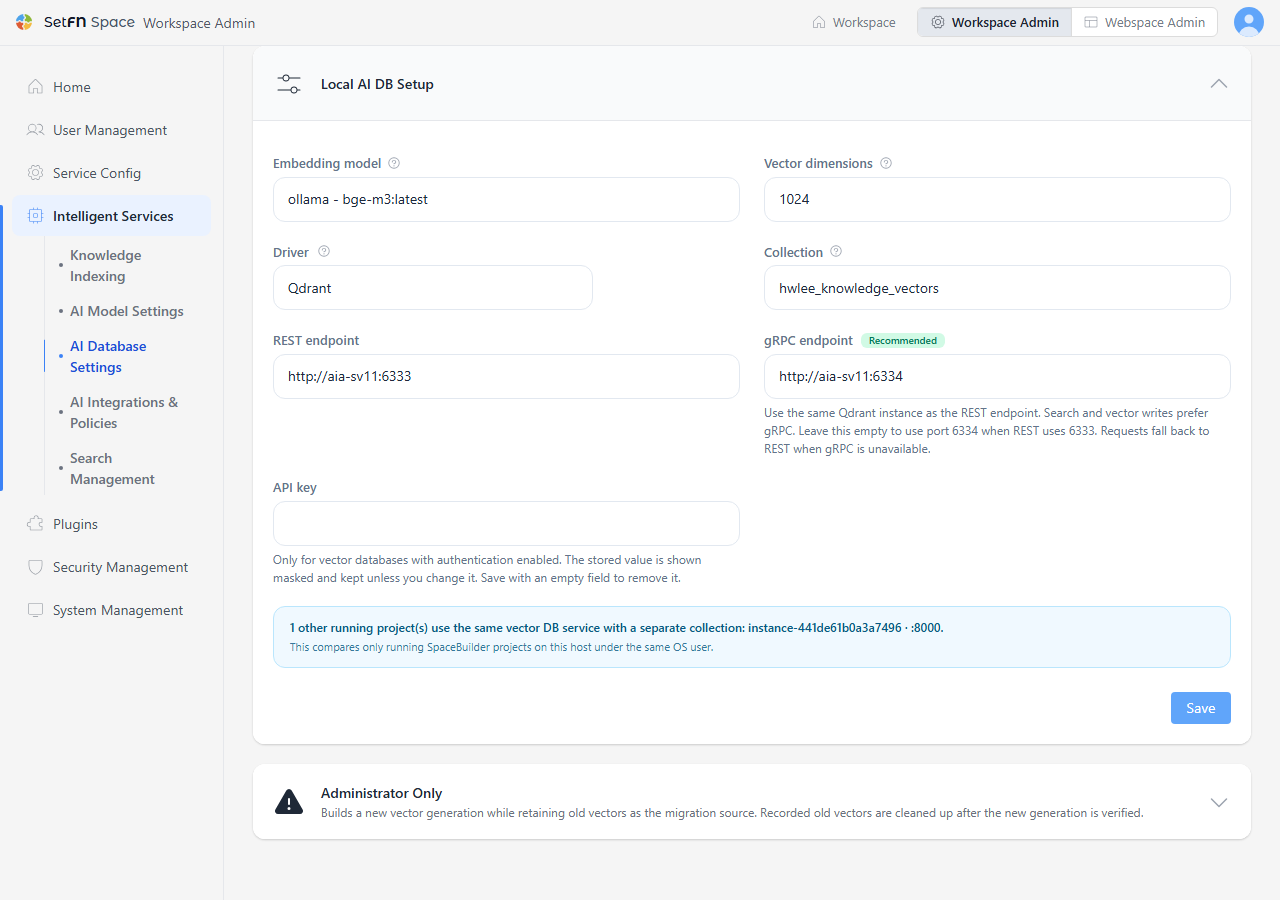
External Vector DB Connection Info
When you select an external vector DB driver like Milvus or Qdrant, fill in these additional fields. For Qdrant, you enter separate REST and gRPC endpoints.
| Item | Description |
|---|---|
| Collection | The collection name to use, distinct per instance. |
| REST endpoint | The external vector DB server's REST API address (Qdrant default: http://localhost:6333) |
| gRPC endpoint (Qdrant, recommended) | The gRPC address of the same Qdrant instance as REST (default: http://localhost:6334). Search and vector storage use gRPC first. If left blank, 6334 is used automatically when the REST address is on port 6333; it falls back to REST if it can't connect. |
| API key | Only fill this in if authentication is enabled on the external vector DB. The stored value shows masked on screen; saving it blank deletes it. |