'/%3e%3cpath%20id='cross_2'%20data-name='cross%202'%20class='cls-2'%20d='M20.612,30.43h0a5.361,5.361,0,1,0-10.723,0H0A33.709,33.709,0,0,1,30.569,0V9.75a5.361,5.361,0,1,1,0,10.723V30.43Z'%20transform='translate(67.193%200.007)%20rotate(90)'/%3e%3cpath%20id='cross_3'%20data-name='cross%203'%20class='cls-3'%20d='M20.612,30.43h0a5.361,5.361,0,1,0-10.723,0H0A33.709,33.709,0,0,1,30.569,0V9.75a5.361,5.361,0,1,1,0,10.723V30.43Z'%20transform='translate(67.186%2067.041)%20rotate(180)'/%3e%3cpath%20id='cross_4'%20data-name='cross%204'%20class='cls-4'%20d='M20.6,30.5h0a5.361,5.361,0,1,0-10.723,0H0A33.71,33.71,0,0,1,30.56,0V9.818a5.361,5.361,0,1,1,0,10.723V30.5Z'%20transform='translate(0%2067.041)%20rotate(-90)'/%3e%3c/svg%3e)
Server Restart and System Maintenance
The device on which SpaceBuilder is installed functions as the "server." This page guides you through restarting and maintaining the server.
Starting Automatically When the Computer Turns On
SpaceBuilder only runs while its executable is running. On a Linux server intended for continuous operation, we recommend configuring it to start automatically after the computer reboots.
Linux auto-start configuration must be written to match your installation location and the user running it. For checking the username, writing the configuration file, and starting/stopping and viewing logs, see Auto-Start Setup in the Linux Installation Guide, step by step.
Restarting the Server
Restarts the current server. Access may be briefly interrupted during the restart.
When a Restart Is Needed
- After installing new plugins, AI models, and so on
- If the background service remains in a
Warningstate or errors keep increasing - If response speed suddenly slows down or a feature stops working correctly
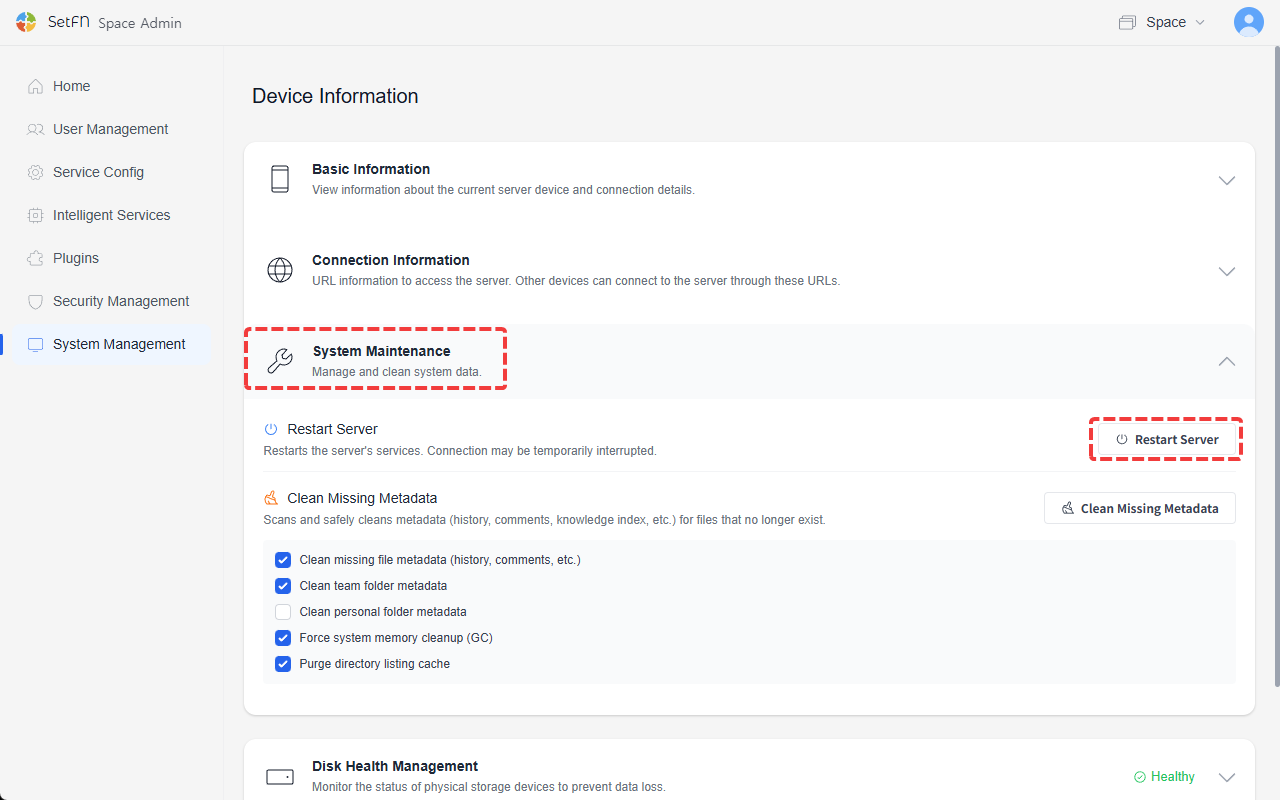
Since ongoing uploads/downloads are interrupted during a restart, we recommend performing it at a time with fewer active users.
Metadata Cleanup
Finds and cleans up leftover records still linked to files that have already been deleted. Targets include file records, comments, and AI search data, and you can run only the items you select.
| Item | Description |
|---|---|
| Clean up orphaned file metadata | Cleans up file records and comments left behind without the original file |
| Clean up team folder metadata | Cleans up unnecessary leftover file information in team spaces |
| Clean up personal folder metadata | Cleans up unnecessary leftover file information in personal spaces |
| Clean up system memory | Frees up memory by forcing garbage collection |
| Clear directory listing cache | Clears the temporarily cached folder listing and forces it to reload |