'/%3e%3cpath%20id='cross_2'%20data-name='cross%202'%20class='cls-2'%20d='M20.612,30.43h0a5.361,5.361,0,1,0-10.723,0H0A33.709,33.709,0,0,1,30.569,0V9.75a5.361,5.361,0,1,1,0,10.723V30.43Z'%20transform='translate(67.193%200.007)%20rotate(90)'/%3e%3cpath%20id='cross_3'%20data-name='cross%203'%20class='cls-3'%20d='M20.612,30.43h0a5.361,5.361,0,1,0-10.723,0H0A33.709,33.709,0,0,1,30.569,0V9.75a5.361,5.361,0,1,1,0,10.723V30.43Z'%20transform='translate(67.186%2067.041)%20rotate(180)'/%3e%3cpath%20id='cross_4'%20data-name='cross%204'%20class='cls-4'%20d='M20.6,30.5h0a5.361,5.361,0,1,0-10.723,0H0A33.71,33.71,0,0,1,30.56,0V9.818a5.361,5.361,0,1,1,0,10.723V30.5Z'%20transform='translate(0%2067.041)%20rotate(-90)'/%3e%3c/svg%3e)
创建架构文件(.sfn)
WebSpace 的乐趣从一个小文件开始。在架构文件(.sfn)中定义要保存的数据和权限并部署后,数据库和 API 就会一同准备就绪。您还可以接着构建这样的服务:在界面上输入的内容会被实际保存,并实时显示在其他用户的界面上。
架构文件是服务的设计图。保存文件时,实际的数据库不会发生变化;只有在 API 构建 中部署后,才会反映到运行环境。
创建流程
- 创建架构文件。
- 配置表和列。
- 确认各 API 的访问权限。
- 选择存储引擎并部署。
- 在 HTML 或应用中调用生成的 API。
不必一开始就完成所有项目。最容易理解的方法是:先从一个小表开始,在实际界面中录入数据,然后再逐步扩展所需的结构和权限。
创建新的架构文件
在工作空间中选择 创建 > 模板文件 > 新建架构(DB)。
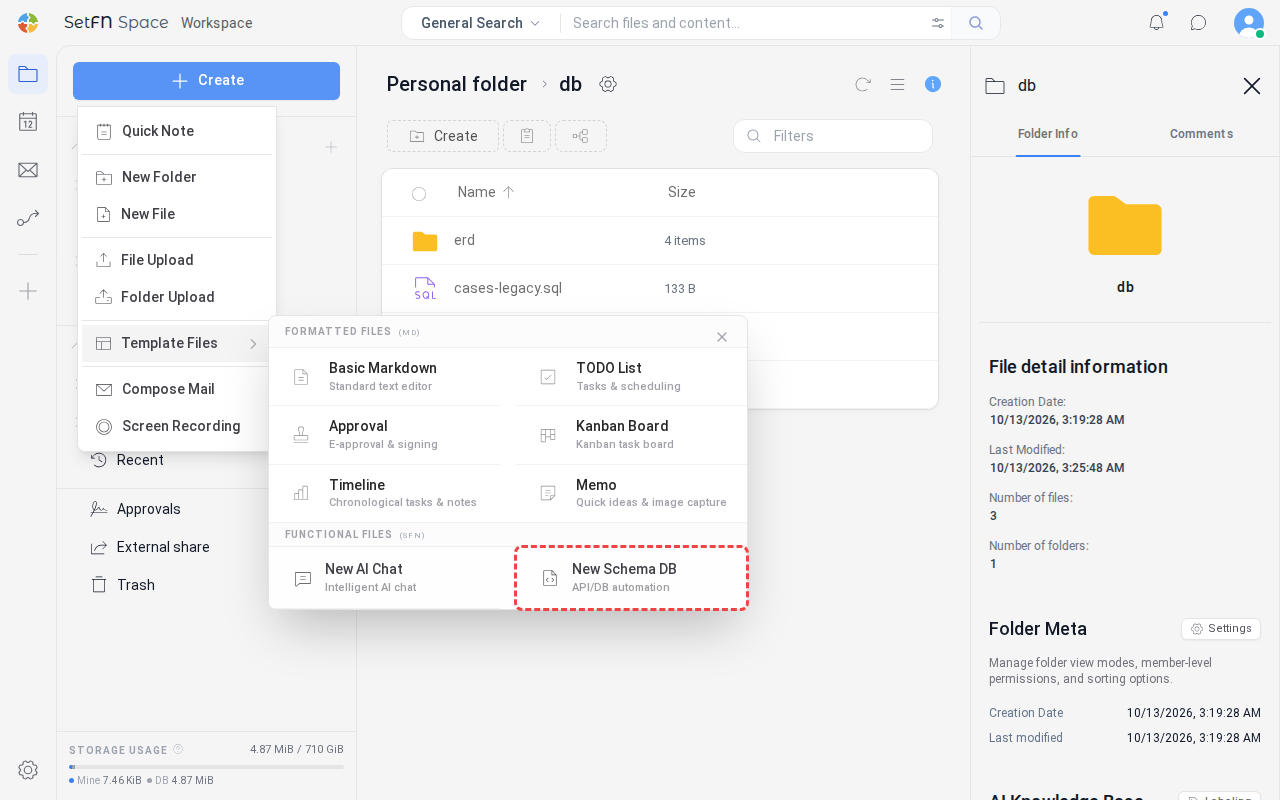
输入文件名并保存后,架构文件即创建完成。
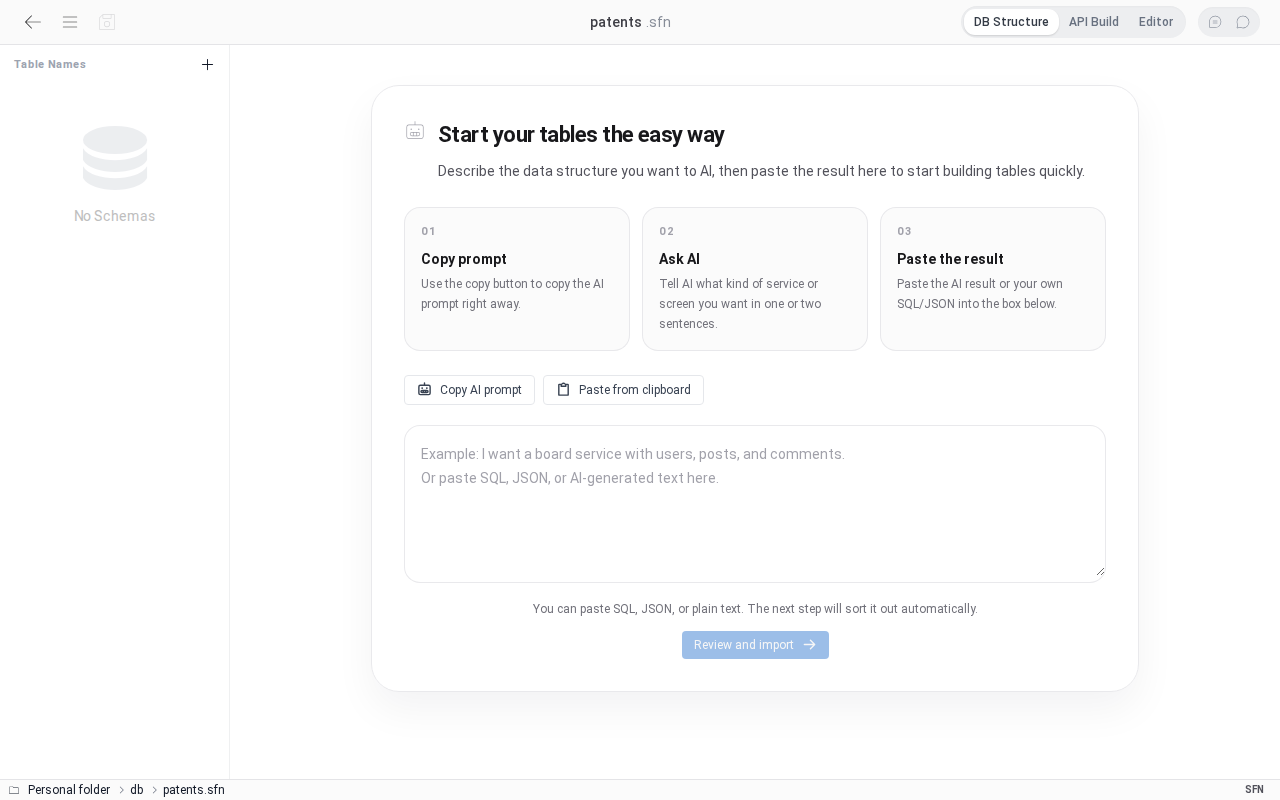
在此步骤中不选择数据库引擎。先创建数据结构,然后在部署步骤中从 SQLite3、PostgreSQL、MySQL 或 MariaDB 中选择实际的存储引擎。
创建数据结构
可以从头开始手动创建,也可以用 AI 生成草稿后再加以完善。如果已有正在使用的 SQL,也可以导入后再开始。
1. 用 AI 生成草稿
即使不熟悉所有表相关术语也没关系。先说明想要与谁一起管理哪些信息,AI 就会生成可供起步的结构。
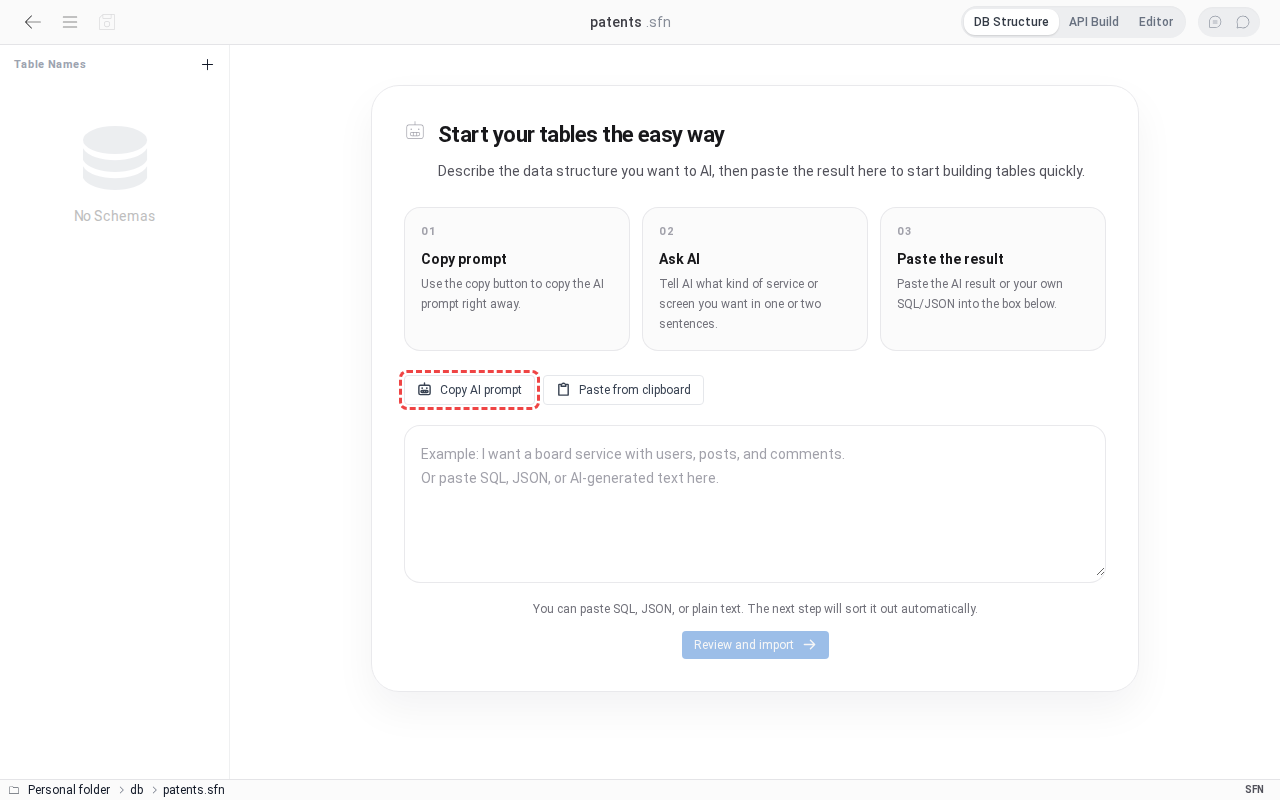
- 点击
复制 AI 提示词按钮。 - 将复制的提示词粘贴到您使用的 AI 服务聊天窗口中。
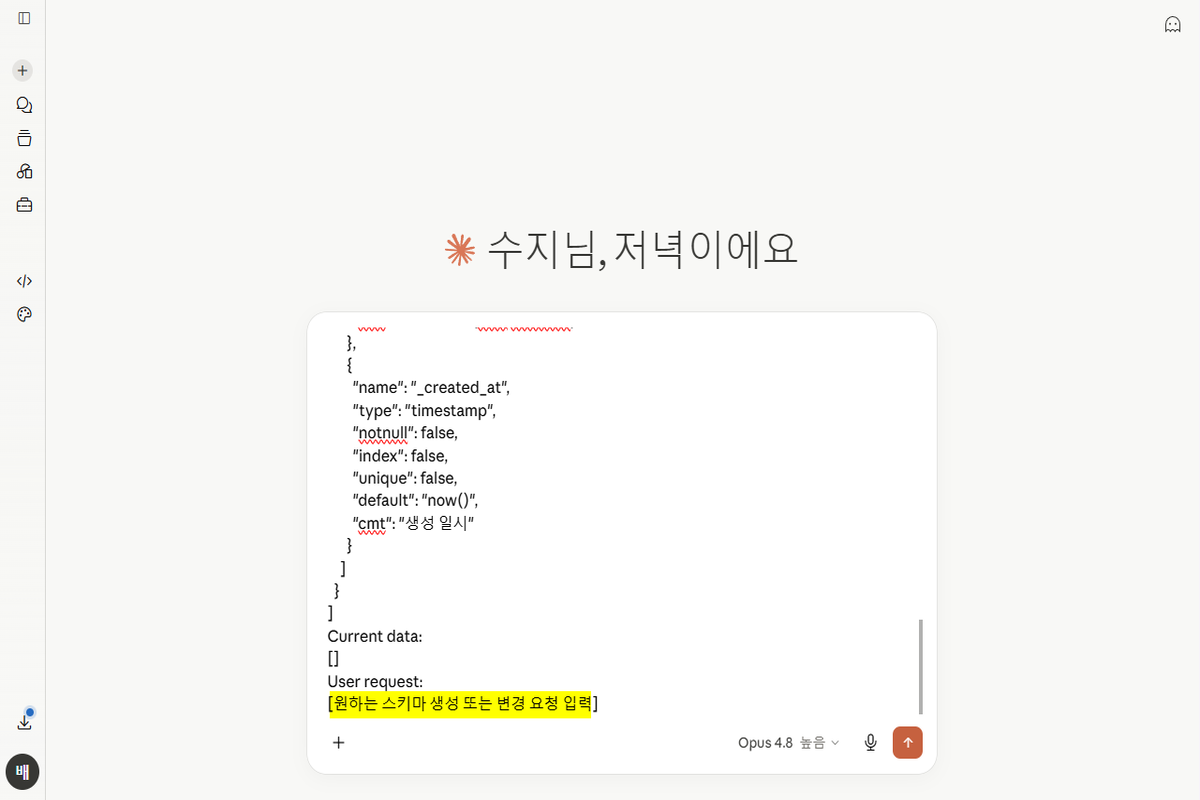
- 在说明文最下方的
## 请求下写下想要创建的服务。例:管理专利名称、申请号、负责人和进展状态,并且只允许负责人本人和管理员修改。
- 复制 AI 生成的 JSON,粘贴到导入界面。
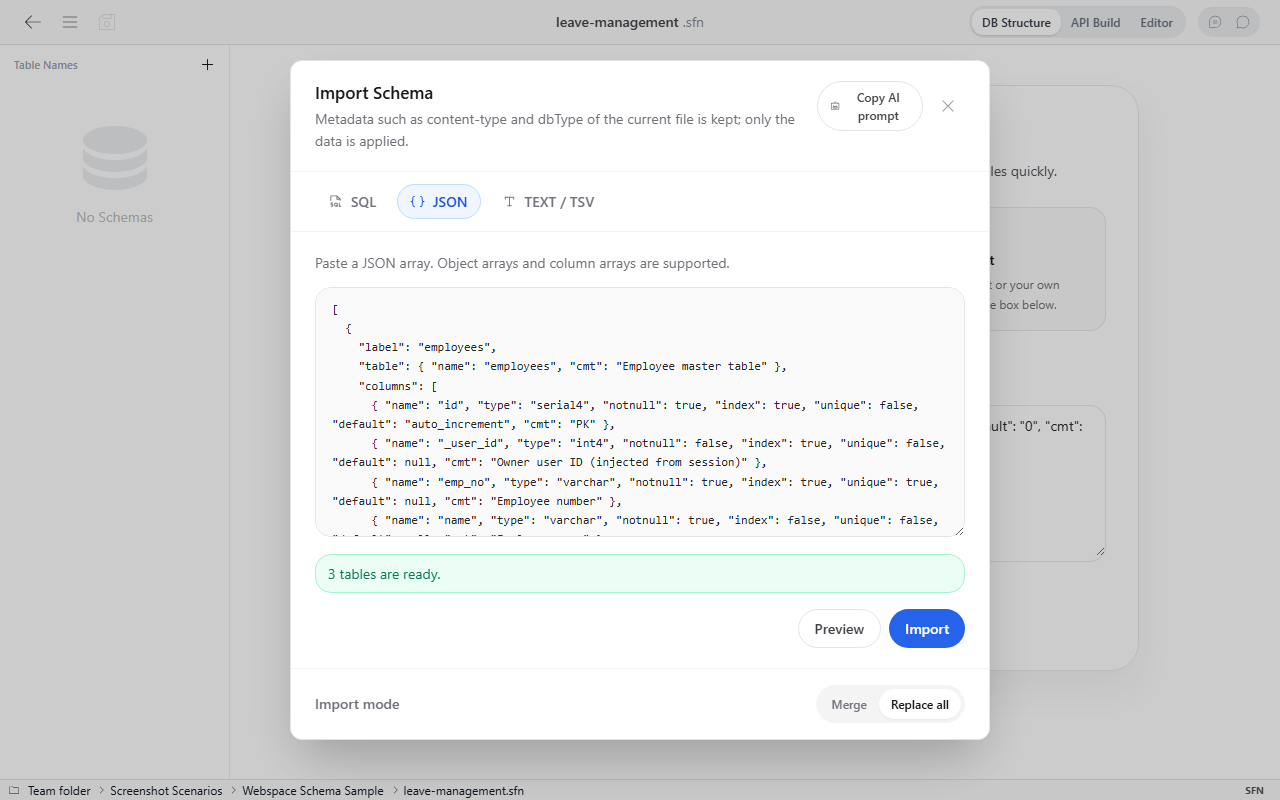
- 点击
导入按钮后,架构中会如下图所示创建表结构。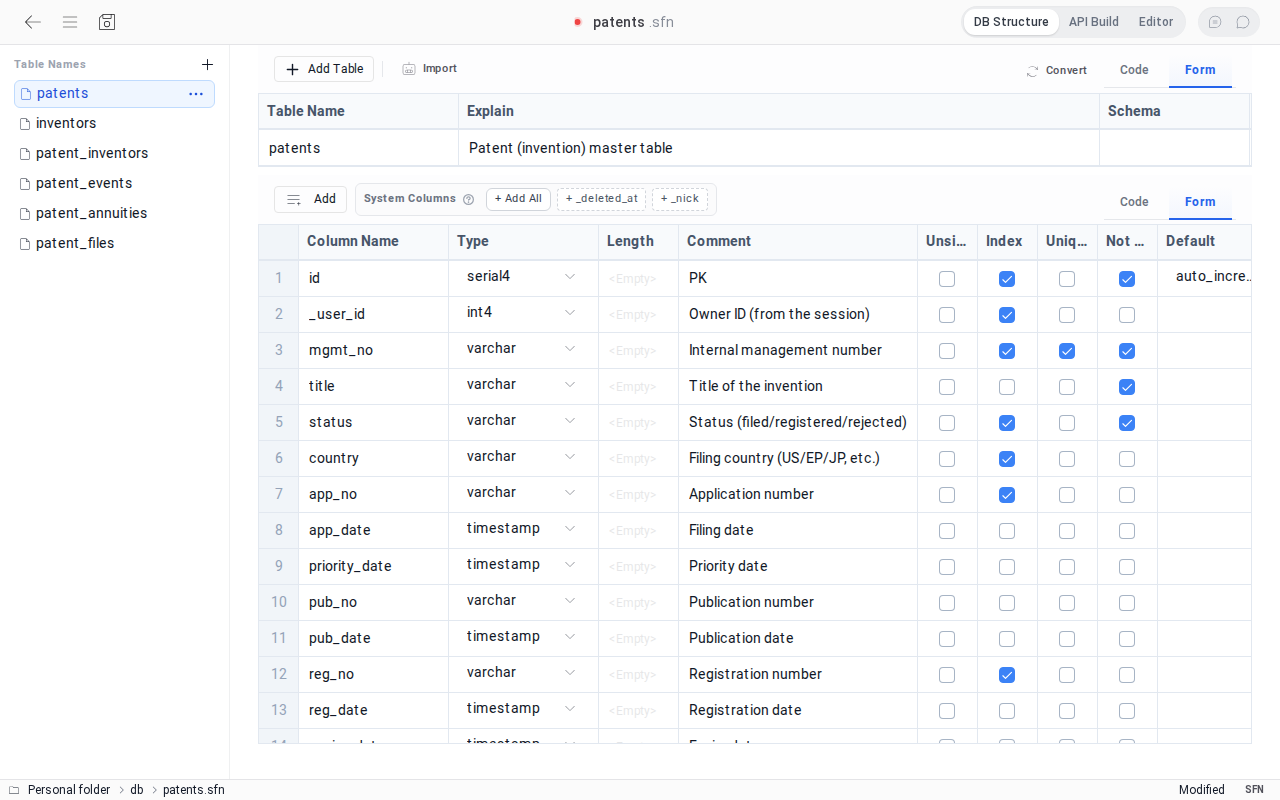
复制的说明文中包含架构文件的格式和编写规则。相比只适用于特定数据库的 SQL,它优先采用可在多种存储引擎上使用的结构。
复制 AI 提示词 按钮复制的说明文如下。这是在空架构、SQLite 引擎、中文界面下复制的示例,内容会随当前架构、数据库引擎和界面语言而变化。请从该提示词开始,而不是手动编写架构文件。
You are a database schema assistant.
Return only valid JSON.
Do not add explanations.
Do not wrap the answer in markdown fences.
Return only the data array for a SetFN schema file.
Do not include content-type, dbType, or apiBuild.
Current deployment engine: SQLite.
The storage engine is deployment configuration, not schema syntax. Keep the schema portable across SQLite, PostgreSQL, MySQL, and MariaDB.

## Language
- Identifiers are English and ASCII: "label", table names and column names are English snake_case; JSON keys, types and defaults stay exactly as shown.
- Human-facing strings are written in Chinese (the user's UI language, locale "zh"): every "cmt" (table and column comments, including the allowed values description).
- The user's request below may be written in Chinese or Korean. Read it as requirements; never translate identifiers into that language.
- The current state below is data and may contain text in any language. Keep existing names and keys exactly as they are.

Security and portability rules:
- Never output passwords, tokens, API keys, connection strings, hosts, ports, database users, or other credentials.
- Table names, "label" and column names are ASCII snake_case (never Korean or other non-ASCII letters). Every table has columns, starting with the id column shown below.
- Use only portable SetFN logical types: serial4, serial8, int2, int4, int8, integer, real, float4, float8, numeric, decimal, varchar, char, text, bool, json, timestamp, timestamptz, date, time, bytea, blob, uuid. Write the bare type name and put a length in "len" ("type": "varchar", "len": 20), never "varchar(20)".
- Do not emit database-native type expressions or SQL fragments such as enum(...), SET(...), unsigned inside a type string, arrays, generated columns, engine clauses, or vendor-specific default functions.
- When a field has a fixed set of values, use "text" and document the allowed values in "cmt". Do not invent an enum property.
- Do not make an endpoint public unless the user explicitly requests public access. Never make create, update, or delete public by default.
- Default every table to signed-in access. Use ownerOnly only with a valid owner column such as "_user_id".

Use canonical defaults regardless of deployment engine.
- Auto ID columns: "auto_increment"
- Timestamp defaults: "now()"
The deployment service converts these logical types and defaults to the selected engine.

Recommended system columns:
- "_user_id": owner user id. Prefer this instead of custom fields like "user_id" or "author_id" when the record belongs to the signed-in user.
- "_nick": writer nickname. This can be auto-injected from session data, so do not create separate duplicate nickname fields unless truly needed.
- "_created_at": created timestamp. Prefer this instead of custom fields like "created_at".
- "_updated_at": updated timestamp. Prefer this instead of custom fields like "updated_at".
- "_deleted_at": optional soft-delete timestamp. Include only when soft delete is needed.

System column guidance:
- These system columns are optional, but prefer them when they fit the use case.
- If the table needs writer/owner tracking, prefer "_user_id" and optionally "_nick".
- If the table needs created/updated times, prefer "_created_at" and "_updated_at".
- Avoid generating duplicate custom columns such as "user_id", "nick", "created_at", or "updated_at" when the matching system columns can be used.
- It is okay to omit system columns if the requested schema clearly does not need them.

Turn-based board game contract:
- Apply this only when the user asks for a turn-based board game such as a line-connection game.
- Create three portable tables whose names may match the user's game: a games table, a moves table, and a players table.
- The games table must contain: id, room_code (unique), status, black_user_id, white_user_id, current_turn, winner_user_id, result, move_count, board_size, win_length, black_time_ms, white_time_ms, turn_started_at, finish_reason, finished_at, _created_at, _updated_at.
- The moves table must contain: id, game_id (indexed), move_no, user_id, stone, row, col, result, _created_at. Make (game_id, row, col) unique when the schema format supports it.
- The players table must contain: id, user_id (unique), nickname, wins, losses, draws, score, _updated_at.
- Use portable logical types and defaults. Do not add an eventProcessor field to table data. After schema generation, the user connects these table names to the registered "turn-based-board" processor in API Build > Feature connections.
- Do not invent processor IDs or game-specific server handlers.

Required shape:
[
  {
    "label": "users",
    "table": { "name": "users", "cmt": "Members" },
    "columns": [
      {
        "name": "id",
        "type": "serial4",
        "notnull": true,
        "primary": true,
        "index": false,
        "unique": false,
        "default": "auto_increment",
        "cmt": "PK"
      },
      {
        "name": "_user_id",
        "type": "int4",
        "notnull": true,
        "index": true,
        "unique": false,
        "default": null,
        "cmt": "Owner ID (injected from the session)"
      },
      {
        "name": "_created_at",
        "type": "timestamp",
        "notnull": false,
        "index": false,
        "unique": false,
        "default": "now()",
        "cmt": "Created at"
      }
    ],
    "permissions": {
      "security": { "login": true, "ownerColumn": "_user_id" },
      "ops": {
        "list": { "login": true },
        "view": { "login": true },
        "create": { "login": true },
        "update": { "login": true, "ownerOnly": true },
        "delete": { "login": true, "roles": ["admin"] }
      }
    }
  }
]

Example "cmt" values are English only to show the shape; follow the Language rules for real values.

Current data:
[]

## 结果
请只回复上述格式的 data 数组 JSON。说明、标签、提示文字等供人阅读的文字请用中文编写。

## 请求
[请在此处写下您想要创建或更改的架构需求]
AI 的结果终究只是草稿。请在部署前亲自确认:名称是否易于理解、是否包含个人信息、谁应当可以查看和修改。
2. 导入 SQL
在 导入 > SQL 中可以粘贴现有的 CREATE TABLE 语句。系统会读取 SQLite、PostgreSQL、MySQL/MariaDB 的主要类型、默认值、索引和约束条件,并转换为架构文件结构。
如果在工作空间中打开了 SQL 文件,也可以使用 转换为 SetFN 架构。无论使用哪种方式,都会应用相同的转换规则。
3. 在界面上直接创建
在表格形式的编辑界面中,可以逐个添加表和列。
添加表
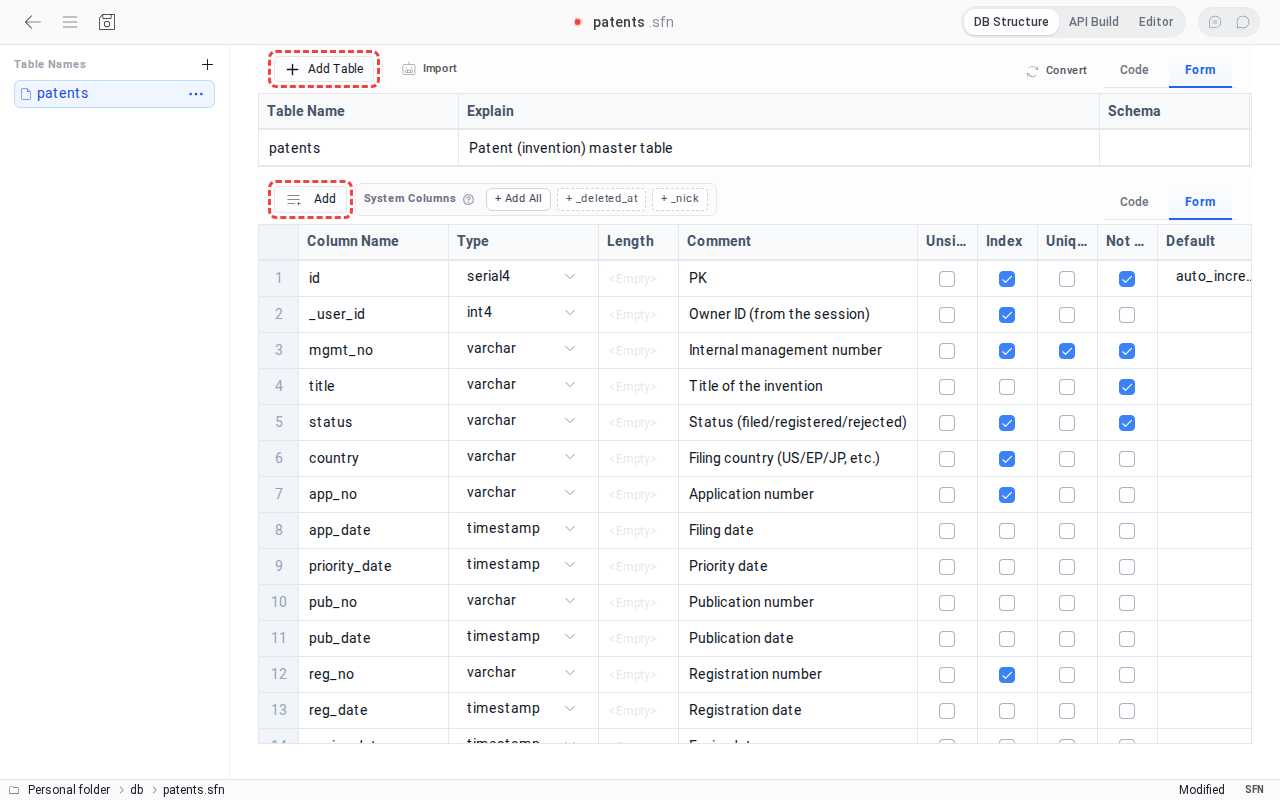 点击主界面上方的
添加表 按钮。输入表信息。
| 项目 | 说明 |
|---|---|
| Table Name | 也用于 API 地址的表名(例:user_profile) |
| Explain | 便于用户理解的表说明 |
| Schema | 数据库架构名称(例:public) |
添加列
点击 添加 按钮并选择 在顶部添加 或 在底部添加,列列表中会新增一行(row)。
一行对应一列。
可以设置以下项目。
| 项目 | 说明 | 示例 |
|---|---|---|
| Column Name | 列名 | user_id, email |
| Type | 数据类型 | varchar, int, bool |
| Length | 数据长度 | 255 |
| Comment | 列说明 | 用户名 |
| Default | 默认值 | auto_increment, NULL |
| Unsigned | 是否只允许正数 | - |
| Index | 是否设置索引 | - |
| Unique | 是否设置唯一值 | - |
| Not null | 是否必填 | - |
在 系统列 菜单中,可以选择并添加 _user_id、_nick、_created_at 等记录用户和创建时间时常用的列。
复制和删除列
右键点击列会显示上下文菜单。
- 复制后添加:从
复制并插入到所选项上方、复制并插入到所选项下方、复制并添加到最顶部、复制并添加到最底部中选择一项,即可添加与所选列属性相同的列。 删除所选行:删除所选列。
4. 以 JSON 编辑
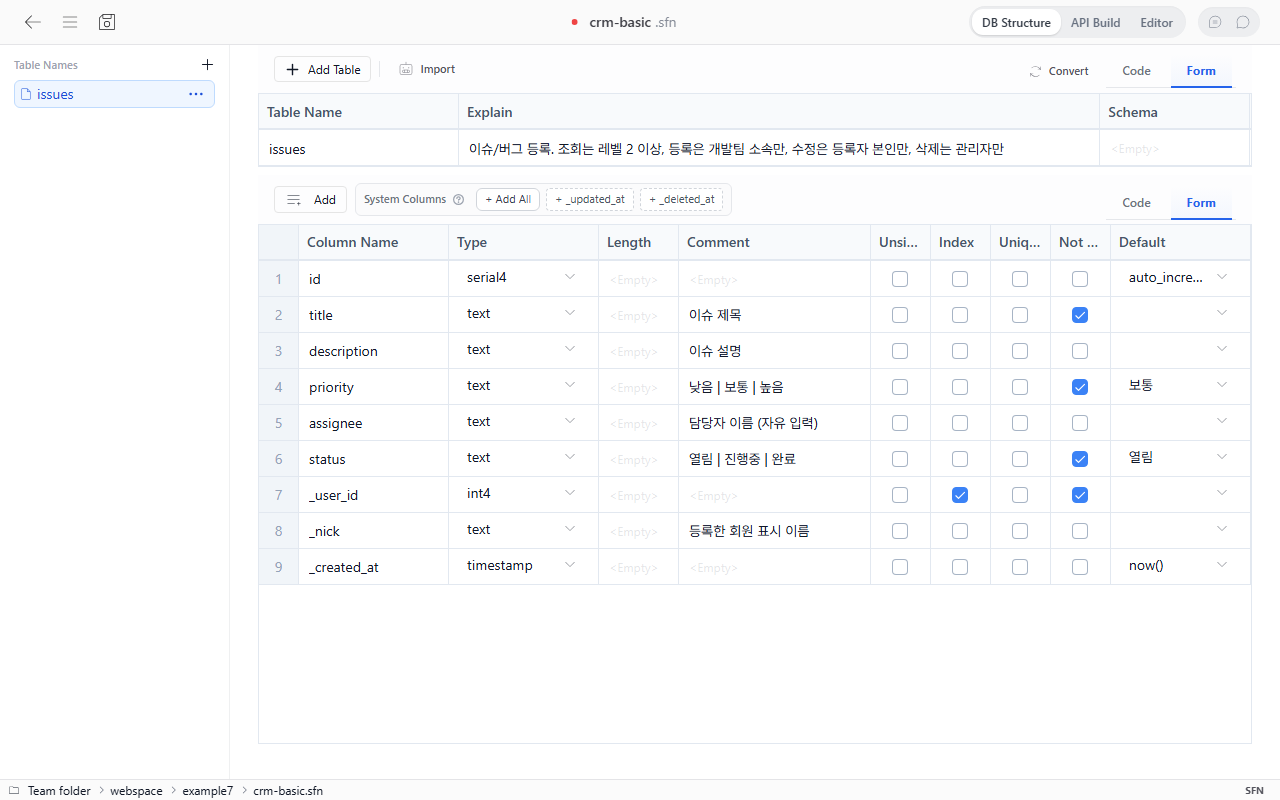 点击页面右上方的
编辑器,即可以 JSON 形式编写整个结构。JSON 与表格编辑界面使用相同的内容,因此可以根据需要在两种方式之间切换编辑。
下面是一个保存电子邮件的简单用户资料示例。
{
  "content-type": "application/setfn-schema",
  "dbType": "sqlite3",
  "data": [
    {
      "table": { "name": "user_profile", "schema": "public" },
      "columns": [
        {
          "name": "email",
          "type": "varchar",
          "len": 255,
          "unique": true,
          "notnull": true
        }
      ],
      "label": "用户资料"
    }
  ]
}
dbType 是为了与现有文件兼容而保留的信息,并不确定实际的运行引擎。最终引擎和连接信息在 API 构建 的存储步骤中设置。
API 权限与数据同样重要
可以为每个 API 设置是否需要登录、最低等级、管理员、团队,以及是否仅允许访问创建者本人的数据。
- 如果列表查询中包含个人信息,请勿使用公开权限。
- 对于按用户区分的数据,请指定用于区分所有者的列。
- 修改和删除以比查看更严格的权限开始会更安全。
- 请在界面的权限摘要中确认所有预期条件均已显示。
保存之后
使用左上方的保存按钮或 Ctrl+S 保存架构文件。现在可以在 API 构建 中确认端点和权限,并部署到实际数据库。
部署完成后,请尝试录入一条小数据。从刚创建的结构作为 API 响应返回的那一刻起,架构文件就不再只是一份文档,而是一个运转中的服务。
注意事项
- 表名和列名只能使用英文小写字母、数字和下划线(_)。
- 如果列较多,可以利用 JSON 编辑或 SQL 导入。
- 覆盖已有数据的架构可能会根据管理员策略被禁止,或仅允许管理员和部署管理人员执行。
后续步骤
现在请在构建 API 并部署数据库中确认存储引擎和端点,并运行您的第一个 API。